
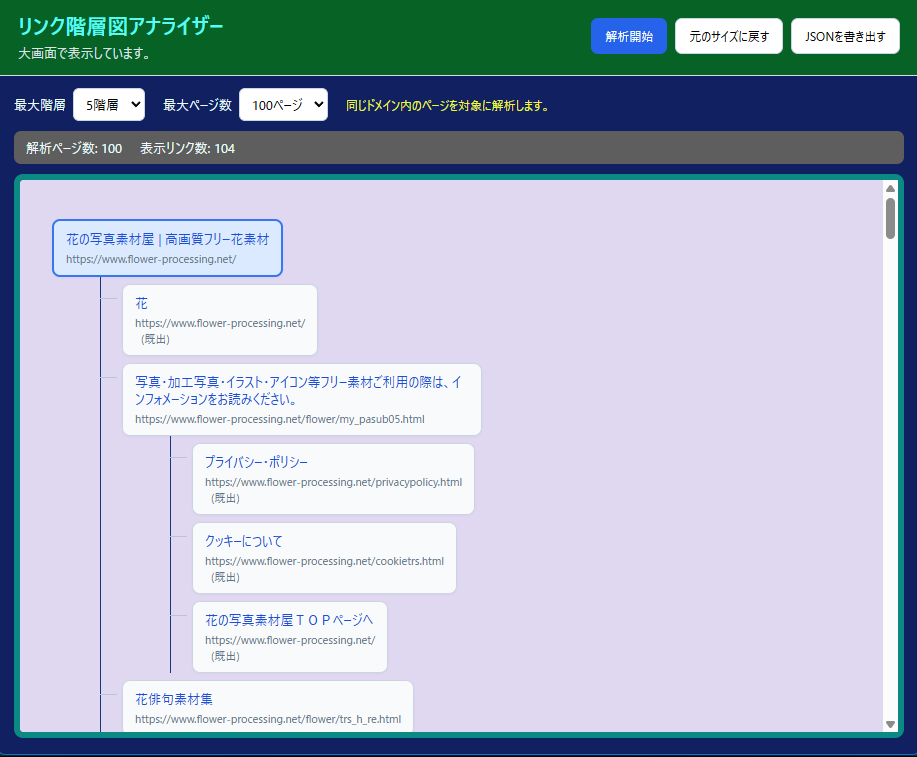
WEBページのリンク階層をフローチャート化して一覧表示します。
ファイル構成
index.html style.css script.js background.js manifest.json
Chrome への導入方法
1. 各ソースコードのコピペまたは※ZIPファイルをダウンロードして、展開します。
2. Chromeのアドレス欄に chrome://extensions/ と入力します。または、ブラウザ右上の・・・をクリックして拡張機能→拡張機能を管理をクリック
3. 右上の「デベロッパーモード」をオンにします。
4. 「パッケージ化されていない拡張機能を読み込む」をクリックします。
5. 展開した link-flowchart-fullscreen-v1.4 フォルダーを選択します。
6. アドレスバー右側に拡張機能が表示されたら、Chromeで適当なWebページを開いて動作を確認します。
Edge への導入方法
1. 各ソースコードのコピペまたは※ZIPファイルをダウンロードして、展開します。
2. Edge のアドレスバーに edge://extensions/ と入力します。または、ブラウザ右上の・・・をクリックして拡張機能をクリック
3. 左下などにある「開発者モード」をオンにします。
4. 画面右側の「展開して読み込み」をクリックし、展開した link-flowchart-fullscreen-v1.4 フォルダーを選択します。
5. アドレスバー右側に拡張機能が表示されたら、Edge で適当なWebページを開いて動作を確認します。
フォルダー名は任意の名前に変更してもOKです。
6階層 200ページまで可能
※ZIPファイルはページ最後にダウンロードリンクを設けています
| HTML |
<!DOCTYPE html>
<html lang="ja">
<head>
<meta charset="UTF-8">
<meta name="viewport" content="width=device-width, initial-scale=1.0">
<title>リンク階層図アナライザー</title>
<link rel="stylesheet" href="style.css">
</head>
<body>
<header class="topbar">
  <div><h1>リンク階層図アナライザー</h1><p id="status">準備しています。</p></div>
  <div class="actions">
    <button id="scanButton" class="primary">解析開始</button>
    <button id="openLargeButton">大画面にする</button>
    <button id="restoreSizeButton" hidden>元のサイズに戻す</button>
    <button id="exportButton" disabled>JSONを書き出す</button>
  </div>
</header>
<main>
  <section class="settings">
    <label>最大階層
      <select id="depthSelect">
        <option value="1">1階層</option><option value="2">2階層</option>
        <option value="3">3階層</option><option value="4">4階層</option>
        <option value="5" selected>5階層</option><option value="6">6階層</option>
      </select>
    </label>
    <label>最大ページ数
      <select id="pageLimitSelect">
        <option value="25">25ページ</option><option value="50">50ページ</option>
        <option value="100" selected>100ページ</option><option value="200">200ページ</option>
      </select>
    </label>
    <span class="hint">同じドメイン内のページを対象に解析します。</span>
  </section>
  <section class="summary" id="summary"><span>ページ数: 0</span><span>リンク数: 0</span></section>
  <section class="canvas-wrap"><div id="canvas" class="canvas"><div class="empty">「解析開始」を押すと、ここにリンク階層図が表示されます。</div></div></section>
</main>
<script src="script.js"></script>
</body>
</html>| script.js |
const statusEl=document.getElementById("status");
const canvasEl=document.getElementById("canvas");
const summaryEl=document.getElementById("summary");
const scanButton=document.getElementById("scanButton");
const openLargeButton=document.getElementById("openLargeButton");
const restoreSizeButton=document.getElementById("restoreSizeButton");
const exportButton=document.getElementById("exportButton");
let latestTree=null,latestStats={pages:0,links:0};

function getTargetTabId(){
  const value=new URLSearchParams(location.search).get("targetTabId");
  if(!value)return null;
  const id=Number(value);
  return Number.isInteger(id)&&id>0?id:null;
}
async function getSourceTab(){
  const targetTabId=getTargetTabId();
  if(targetTabId!==null){
    try{return await chrome.tabs.get(targetTabId)}
    catch{throw new Error("解析元のタブが見つかりません。元のページを開き直してください。")}
  }
  const tabs=await chrome.tabs.query({active:true,currentWindow:true});
  if(!tabs.length||!tabs[0].id)throw new Error("解析するタブを取得できませんでした。");
  return tabs[0];
}
async function extractLinksFromCurrentPage(tabId){
  const results=await chrome.scripting.executeScript({
    target:{tabId},
    func:()=>({
      url:location.href,title:document.title||location.href,
      links:Array.from(document.querySelectorAll("a[href]")).map(a=>{
        let url;try{url=new URL(a.href,location.href)}catch{return null}
        if(!["http:","https:"].includes(url.protocol))return null;
        return {url:url.href.split("#")[0],title:(a.innerText||a.getAttribute("aria-label")||a.title||url.href).trim()}
      }).filter(Boolean)
    })
  });
  return results[0].result;
}
async function scanWebsite(){
  scanButton.disabled=true;exportButton.disabled=true;
  canvasEl.innerHTML='<div class="empty">ページを解析しています…</div>';
  statusEl.textContent="解析中です。ページ数によって時間がかかります。";
  try{
    const sourceTab=await getSourceTab();
    if(!sourceTab.id||!sourceTab.url||!/^https?:/.test(sourceTab.url))
      throw new Error("通常のWebページを開いてから実行してください。Chrome内部ページや拡張機能ページは解析できません。");
    const maxDepth=Number(document.getElementById("depthSelect").value);
    const maxPages=Number(document.getElementById("pageLimitSelect").value);
    const origin=new URL(sourceTab.url).origin;
    const visited=new Map();
    const rootData=await extractLinksFromCurrentPage(sourceTab.id);
    const root={title:rootData.title||sourceTab.url,url:rootData.url||sourceTab.url,children:[],depth:0};
    visited.set(root.url,root);
    const queue=[{node:root,data:rootData,depth:0}];
    while(queue.length&&visited.size<maxPages){
      const current=queue.shift();
      if(current.depth>=maxDepth)continue;
      const uniqueLinks=[],seenAtThisLevel=new Set();
      for(const link of current.data.links){
        let parsed;try{parsed=new URL(link.url)}catch{continue}
        if(parsed.origin!==origin||seenAtThisLevel.has(link.url))continue;
        seenAtThisLevel.add(link.url);uniqueLinks.push(link);
      }
      for(const link of uniqueLinks){
        let child=visited.get(link.url);
        if(!child){
          child={title:link.title||link.url,url:link.url,children:[],depth:current.depth+1};
          visited.set(link.url,child);current.node.children.push(child);
          if(visited.size>=maxPages)break;
          try{const pageData=await fetchPageLinks(link.url,origin);queue.push({node:child,data:pageData,depth:current.depth+1})}
          catch{child.error=true}
        }else if(!current.node.children.some(item=>item.url===child.url)){
          current.node.children.push({title:link.title||child.title,url:child.url,children:[],reference:true,depth:current.depth+1});
        }
      }
    }
    latestTree=root;latestStats={pages:visited.size,links:countNodes(root)};
    renderTree(root);
    summaryEl.innerHTML=`<span>解析ページ数: ${latestStats.pages}</span><span>表示リンク数: ${latestStats.links}</span>`;
    statusEl.textContent=`解析完了: ${sourceTab.title||sourceTab.url}`;
    exportButton.disabled=false;
  }catch(error){
    canvasEl.innerHTML=`<div class="error">${escapeHtml(error.message||String(error))}</div>`;
    statusEl.textContent="解析できませんでした。";
  }finally{scanButton.disabled=false}
}
async function fetchPageLinks(url,origin){
  const response=await fetch(url,{credentials:"include"});
  if(!response.ok)throw new Error(`HTTP ${response.status}`);
  const html=await response.text(),doc=new DOMParser().parseFromString(html,"text/html");
  const links=Array.from(doc.querySelectorAll("a[href]")).map(a=>{
    try{
      const parsed=new URL(a.getAttribute("href"),url);
      if(!["http:","https:"].includes(parsed.protocol)||parsed.origin!==origin)return null;
      return {url:parsed.href.split("#")[0],title:(a.textContent||a.getAttribute("aria-label")||a.title||parsed.href).trim()}
    }catch{return null}
  }).filter(Boolean);
  return {url,title:doc.title||url,links};
}
function countNodes(node){return node.children.reduce((sum,child)=>sum+1+countNodes(child),0)}
function renderTree(root){
  canvasEl.innerHTML="";
  const tree=document.createElement("div");tree.className="tree";
  tree.appendChild(renderNode(root,true));canvasEl.appendChild(tree);
}
function renderNode(node,isRoot=false){
  const ul=document.createElement("ul"),li=document.createElement("li"),card=document.createElement("div");
  card.className="node"+(isRoot?" root":"");
  const anchor=document.createElement("a");anchor.href=node.url;anchor.target="_blank";anchor.rel="noopener noreferrer";anchor.textContent=node.title||node.url;card.appendChild(anchor);
  const url=document.createElement("span");url.className="url";url.textContent=node.url;card.appendChild(url);
  if(node.reference){const ref=document.createElement("span");ref.className="count";ref.textContent="(既出)";card.appendChild(ref)}
  if(node.error){const error=document.createElement("span");error.className="count";error.textContent="(取得不可)";card.appendChild(error)}
  li.appendChild(card);
  if(node.children&&node.children.length){const childList=document.createElement("ul");for(const child of node.children)childList.appendChild(renderNode(child));li.appendChild(childList)}
  ul.appendChild(li);return ul;
}
function escapeHtml(value){return String(value).replace(/[&<>"']/g,ch=>({"&":"&","<":"<",">":">",'"':""","'":"'"}[ch]))}
function downloadJson(){
  if(!latestTree)return;
  const blob=new Blob([JSON.stringify({stats:latestStats,tree:latestTree},null,2)],{type:"application/json"});
  const url=URL.createObjectURL(blob),a=document.createElement("a");
  a.href=url;a.download="link-flowchart.json";a.click();URL.revokeObjectURL(url);
}
async function resizeAnalyzer(width, height) {
  try {
    const currentWindow = await chrome.windows.getCurrent();
    await chrome.windows.update(currentWindow.id, {
      width,
      height,
      state: "normal",
      focused: true
    });
    statusEl.textContent = width > 500
      ? "大画面で表示しています。"
      : "小さいサイズで表示しています。";
    openLargeButton.hidden = width > 500;
    restoreSizeButton.hidden = width <= 500;
  } catch (error) {
    statusEl.textContent = "ウィンドウサイズを変更できませんでした: " + (error.message || String(error));
  }
}
async function openLargeView() {
  await resizeAnalyzer(1200, 800);
}
async function restoreOriginalSize() {
  await resizeAnalyzer(420, 620);
}

scanButton.addEventListener("click",scanWebsite);
openLargeButton.addEventListener("click",openLargeView);
restoreSizeButton.addEventListener("click",restoreOriginalSize);

// 解析ウィンドウは1つだけ使い、ボタンで同じウィンドウのサイズを切り替えます。
restoreSizeButton.hidden = true;
openLargeButton.hidden = false;

async function restoreOriginalSize() {
  // 解析画面を閉じず、同じウィンドウを小さいサイズに変更する。
  try {
    const currentWindow = await chrome.windows.getCurrent();
    await chrome.windows.update(currentWindow.id, {
      width: 420,
      height: 620,
      state: "normal"
    });
    statusEl.textContent = "小さいサイズに戻しました。解析画面は開いたままです。";
  } catch (error) {
    statusEl.textContent = "ウィンドウサイズを変更できませんでした: " + (error.message || String(error));
  }
}
exportButton.addEventListener("click",downloadJson);
if(getTargetTabId()!==null)scanWebsite();
else statusEl.textContent="拡張機能アイコンから解析ウィンドウを開いてください。";| background.js |
chrome.action.onClicked.addListener(async (tab) => {
  try {
    const url = chrome.runtime.getURL("index.html") +
      (tab && tab.id ? "?targetTabId=" + encodeURIComponent(tab.id) : "");
    const existing = await chrome.windows.getAll({ populate: true });
    const analyzerUrl = chrome.runtime.getURL("index.html");
    const existingAnalyzer = existing
      .flatMap(win => win.tabs || [])
      .find(t => t.url && t.url.startsWith(analyzerUrl));

    if (existingAnalyzer && existingAnalyzer.windowId) {
      await chrome.windows.update(existingAnalyzer.windowId, { focused: true });
      return;
    }

    await chrome.windows.create({
      url,
      type: "popup",
      width: 420,
      height: 620,
      focused: true
    });
  } catch (error) {
    console.error("Link Flowchart Analyzer:", error);
  }
});
| manifest.json |
{
  "manifest_version": 3,
  "name": "Link Flowchart Analyzer",
  "version": "1.1.0",
  "description": "現在のページからリンクを解析し、階層図として表示します。",
  "permissions": [
    "activeTab",
    "scripting",
    "windows",
    "tabs"
  ],
  "action": {
    "default_title": "Link Flowchart Analyzer を開く"
  },
  "background": {
    "service_worker": "background.js"
  }
}
| style.css |
*{box-sizing:border-box}
html,body{margin:0;width:100%;min-width:0;height:100%;font-family:"Yu Gothic UI",Meiryo,sans-serif;color:#eafffe;background:#112061}
body{display:flex;flex-direction:column;overflow:hidden}
.topbar{display:flex;align-items:center;justify-content:space-between;gap:18px;padding:14px 20px;color:#58faf2;background:#076325;border-bottom:1px solid #d8dee8;flex:0 0 auto}
h1{margin:0 0 5px;font-size:21px}
.topbar p{margin:0;font-size:13px;color:#dee1e6}
.actions{display:flex;align-items:center;gap:8px;flex-wrap:wrap}
button,select{font:inherit}
button{padding:9px 13px;border:1px solid #cbd5e1;border-radius:7px;background:#fff;cursor:pointer;white-space:nowrap}
button:hover{background:#f1f5f9}
button.primary{background:#2563eb;border-color:#2563eb;color:#fff}
button.primary:hover{background:#1d4ed8}

button.largescreen{background:#5a6309;border-color:#1c1d06;color:#fff}
button.largescreen:hover{background:#2a4b05}

button.JSON{background:#7207a3;border-color:#1c1d06;color:#fff}
button.JSON:hover{background:#37034e}

button:disabled{opacity:.45;cursor:not-allowed}
main{display:flex;flex-direction:column;flex:1;min-height:0;padding:12px 16px 16px;gap:10px}
.settings,.summary{display:flex;align-items:center;gap:18px;flex-wrap:wrap;flex:0 0 auto}
.settings label{display:flex;align-items:center;gap:7px;font-size:13px}
select{padding:6px 8px;border:1px solid #cbd5e1;border-radius:6px;background:#fff}
.hint{font-size:12px;color:#edfa34}
.summary{padding:8px 12px;border-radius:7px;background:#5e5e5e;font-size:13px}
.canvas-wrap{flex:1;min-height:0;border:6px solid #0a8a83;border-radius:9px;background:#e0d7f1;overflow:auto}
.canvas{min-width:100%;min-height:100%;padding:22px;overflow:auto}
.empty{display:grid;place-items:center;min-height:250px;color:#64748b;text-align:center}
.tree{display:flex;align-items:flex-start;gap:34px;min-width:max-content;padding:10px 10px 28px}
.tree ul{list-style:none;margin:0;padding:0 0 0 24px;position:relative}
.tree>ul{padding-left:0}
.tree li{position:relative;padding:7px 0 0 22px}
.tree>ul>li{padding-left:0}
.tree li::before{content:"";position:absolute;top:0;left:0;width:1px;height:100%;background:#17377e}
.tree li::after{content:"";position:absolute;top:21px;left:0;width:17px;height:1px;background:#b8c5d8}
.tree>ul>li::before,.tree>ul>li::after{display:none}
.node{display:inline-block;max-width:360px;padding:9px 12px;border:1px solid #cbd5e1;border-radius:8px;background:#f8fafc;box-shadow:0 1px 2px #0f172a0a;overflow-wrap:anywhere}
.node.root{background:#dbeafe;border:2px solid #3677f0;}
.node a{color:#1d4ed8;text-decoration:none;font-size:13px}
.node a:hover{text-decoration:underline}
.node .url{display:block;margin-top:4px;max-width:340px;color:#64748b;font-size:11px;overflow-wrap:anywhere}
.node .count{display:inline-block;margin-left:6px;color:#64748b;font-size:11px}
.error{color:#b91c1c;padding:14px}
@media(max-width:760px){.topbar{align-items:flex-start;flex-direction:column}.actions{width:100%}}

[hidden] {
  display: none !important;
}起動時の画面等のUIを全面的に変更せず、WEBで公開または再配布は許可致しません。また、個人で使用する場合はOKです
リンク階層図アナライザーの圧縮ファイルをダウンロード