
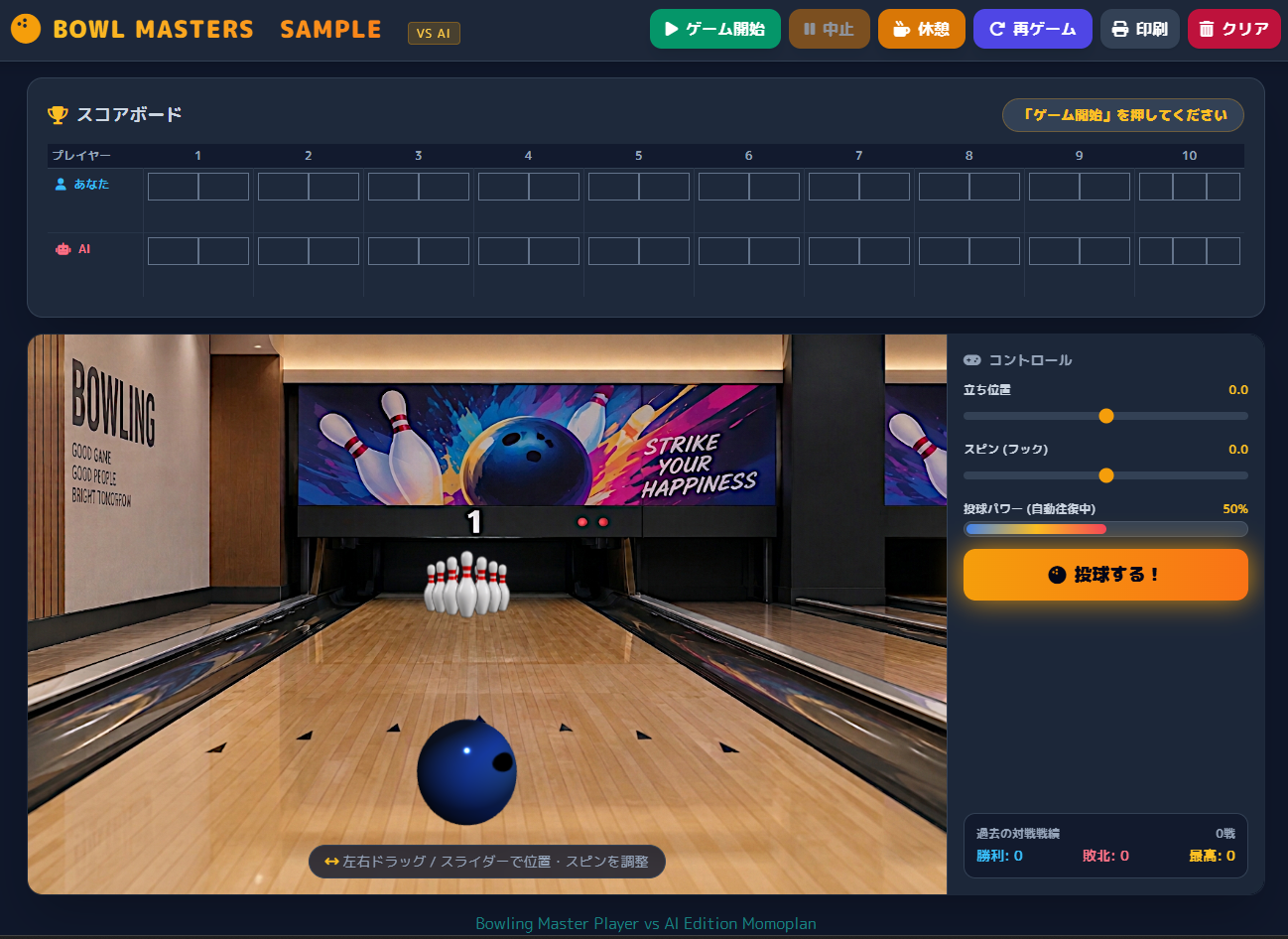
ボーリングゲーム(BOWL MASTERS)のソース公開です。プログラム言語はHTML CSS JavaScript(JS)で構成されています。各ソースコードは行ごとにコメントを入れており、分かりやすくしました。
ソースコードの修正・追加・削除・CSSのデザイン変更等の制限は一切ありませんので安心してご利用ください。
ご利用について
禁止事項としては各ソースの全てを変更せずに、WEBで公開するのはご縁了願います。ただし、WEBの公開で、HTML・CSS等のUIを全面改造して公開する場合はこの限りではありません。
BOWL MASTERSゲームは、各コードを参考してもらうのが本来の目的です。ゲームとしては多少遊べると思いますが、ご使用の際にバグや不具合があるかも知れません。その場合に、管理者MOMOPLANでは修正依頼を受け付けていませんので、開発者様の方で調整をお願いします。
本プログラムの起動について
本プログラムは外部ライブラリを一部使用しています。個々のPCで、直接にbowling_game.htmlを実行(クリック)しても画像エラーが出ます。
この場合は、各ファイルを格納しているフォルダ内で、右クリック→アプリ拡張機能→ターミナルで開く→py -m http.server 8000とコマンド入力→ブラウザでhttp://localhost:8000/bowling_game.htmlと入力します。
端末のサーバー停止はターミナルを開いて「Ctrl + c」、また、レンタルサーバー等の環境があれば、そのままファイルをアップロードすれば起動できます。今回はpython簡易webサーバの構築ですが自身の環境に合わせてもOKです。
※http://localhost:8000 とは、自分のパソコン(ローカル環境)の上で動いているWebサーバーに、ブラウザを使って「ポート番号 8000」経由でアクセスするためのアドレスです。
インターネット上のサーバーではなく、手元のPC内だけで通信するため外部には公開されず、安全にプログラムの動作テストができます
また、ページの最後にサンプルとしてのBOWL MASTERSをサーバーにリンクしていますのでご参考迄に。
使用画像について
使用している画像は、AIで作成して、再加工したものです。個人で使用する以外のWEB公開(サーバー)しての画像使用は許可致しません。
【ファイル階層】
bowling/ フォルダ名は任意
├── bowling_game.html
├── style.css ファイル名任意 <link rel="stylesheet" href="ファイル名.css">
├── game.js ファイル名任意 <script src="ファイル名.js"></script>
├── img/ 画像フォルダ フォルダ名任意 images /
│ ├── bowling_background.png 場内画像
│ └── pin.png ピン画像
└── sound/ 効果音フォルダ
└── pin.mp3 ピン衝突効果音
※フォルダ名やファイル名の変更はご自由に変更可能。画像ファイルの再利用は禁止です。効果音については効果音ラボ様等の素材を使用しています
| 仕 様 | |
| 項 目 | 内 容 |
| ゲーム開始 | ゲーム開始ボタンをクリックして投球するボタンをクリック |
| コントロールエリア | 立ち位置の調整 スピン(フック)の調整 投球パワープログレスバー自動往復 投球するボタン 過去の対戦成績(プレイヤー側) |
| 各ボタン | ゲーム開始 中止 休憩 再ゲーム 印刷 クリア |
| ボタン詳細 | 中止ボタン ゲームを注視して初期画面 休憩ボタン 現在のゲーム途中をストップ 再ゲームボタン 現在の途中ゲームから再開 印刷ボタン スコアの印刷 クリアボタン 保存されたプレイヤー側の勝敗削除 |
| スコアボード | 10回戦のプレイヤー対AIのスコア表示 スペア ストライク等の記号表示 |
| 投球位置 | プログレスバーでの立ち位置の調整または画面上でマウスでドラッグ |
| スピン(フック) | プログレスバーでのスピン(フック)の調整 左カーブ、右カーブ |
| 投球パワー | プログレスバーが自動往復 投球するボタンのタイミングに応じて速度調整 |
| 効果音 | ボールがピンに当たると効果音が出ます。※ただしOFF機能は設けていませんので必要であれば追加してください。 ※オプションとして下記に記述しています。 |
| 印刷 | スコア表の印刷 |
効果音ON/OFFのオプションコード
//<div class="flex flex-wrap items-center gap-2">付近
<button id="soundToggleBtn" onclick="toggleSound()">音: ON</button>


//JS任意の場所
// 音声の有効/無効を管理するフラグ(初期値はON)
let isSoundEnabled = true;

// 音声のON/OFFを切り替える関数
function toggleSound() {
    isSoundEnabled = !isSoundEnabled;

    // ボタンの表示テキストを切り替える
    const btn = document.getElementById('soundToggleBtn');
    if (btn) {
        btn.textContent = isSoundEnabled ? '音: ON' : '音: OFF';
    }
}

//JSコード725行付近

if (dist < ballRadius + pinRadius) {
    pin.isHit = true;

    // --- 修正箇所: 音声が有効な場合のみ再生する ---
    if (isSoundEnabled) {
        const soundClone = new Audio(pinHitSoundSource);
        soundClone.volume = 1.0;
        soundClone.play().catch(error => {
            console.warn('ピンの効果音を再生できませんでした。', error);
        });
    }
| bowling_game.html |
<!DOCTYPE html>
<html lang="ja">
<head>
    <!-- 文字コードをUTF-8に設定 -->
    <meta charset="UTF-8">

    <!-- スマートフォンでも画面幅に合わせて表示 -->
    <meta name="viewport" content="width=device-width, initial-scale=1.0">

    <!-- ブラウザのタブに表示するタイトル -->
    <title>3Dリアルボウリングゲーム (VS AI)</title>

    <!-- Tailwind CSS:画面のレイアウトや色などを設定するCSSライブラリ -->
    <script src="https://cdn.tailwindcss.com"></script>

    <!-- FontAwesome:ボタンや見出しに使用するアイコンライブラリ -->
    <link rel="stylesheet" href="https://cdnjs.cloudflare.com/ajax/libs/font-awesome/6.4.0/css/all.min.css">

    <!-- Three.js:3Dボウリング画面を描画するライブラリ -->
    <script src="https://cdnjs.cloudflare.com/ajax/libs/three.js/r128/three.min.js"></script>

    <!-- 外部CSSファイルを読み込む -->
    <link rel="stylesheet" href="style.css">
</head>

<!-- ページ全体の背景色、文字色、配置などを設定 -->
<body class="bg-slate-900 text-white min-h-screen flex flex-col justify-between overflow-x-hidden">

    <!-- ヘッダー:ゲーム操作ボタンを配置 -->
    <header class="no-print bg-slate-800/90 backdrop-blur border-b border-slate-700 px-4 py-3 shadow-lg z-10">

        <!-- ヘッダー内部の横幅と配置を調整 -->
        <div class="max-w-7xl mx-auto flex flex-wrap justify-between items-center gap-4">

            <!-- ゲームタイトルとアイコン -->
            <div class="flex items-center space-x-3">

                <!-- ボウリングボールのアイコン -->
                <i class="fa-solid font-bold text-3xl text-amber-500 fa-bowling-ball"></i>

                <!-- ゲーム名と対戦モード -->
                <h1 class="text-xl md:text-2xl font-black tracking-wider bg-gradient-to-r from-amber-400 to-orange-500 bg-clip-text text-transparent">
                    BOWL MASTERS SAMPLE <span class="text-xs px-2 py-0.5 rounded bg-amber-500/20 text-amber-300 font-normal border border-amber-500/30">VS AI</span>
                </h1>
            </div>

            <!-- ゲームの操作ボタンをまとめる領域 -->
            <div class="flex flex-wrap items-center gap-2">

                <!-- 新しいゲームを開始するボタン -->
                <button id="btn-start" onclick="startGame()" class="bg-emerald-600 hover:bg-emerald-500 text-white font-bold px-4 py-2 rounded-xl shadow-lg transition duration-200 active:scale-95 flex items-center gap-2">
                    <i class="fa-solid fa-play"></i> ゲーム開始
                </button>

                <!-- ゲームを中止するボタン -->
                <button id="btn-stop" onclick="stopGame()" class="bg-amber-600 hover:bg-amber-500 text-white font-bold px-4 py-2 rounded-xl shadow-lg transition duration-200 active:scale-95 flex items-center gap-2 disabled:opacity-50" disabled>
                    <i class="fa-solid fa-pause"></i> 中止
                </button>

                <!-- ゲームを一時停止して休憩するボタン -->
                <button id="btn-pause"
                    onclick="pauseGame()"
                    class="bg-amber-600 hover:bg-amber-500 text-white font-bold px-4 py-2 rounded-xl shadow-lg transition duration-200 active:scale-95 flex items-center gap-2"
                    disabled>
                    <i class="fa-solid fa-mug-hot"></i> 休憩
                </button>

                <!-- 休憩中の再開、または新しいゲームを開始するボタン -->
                <button id="btn-restart" onclick="restartGame()" class="bg-indigo-600 hover:bg-indigo-500 text-white font-bold px-4 py-2 rounded-xl shadow-lg transition duration-200 active:scale-95 flex items-center gap-2">
                    <i class="fa-solid fa-rotate-right"></i> 再ゲーム
                </button>

                <!-- スコアボードを印刷するボタン -->
                <button id="btn-print" onclick="printScoreboard()" class="bg-slate-700 hover:bg-slate-600 text-white font-bold px-3 py-2 rounded-xl shadow transition duration-200 active:scale-95 flex items-center gap-2">
                    <i class="fa-solid fa-print"></i> 印刷
                </button>

                <!-- 保存されている対戦履歴を削除するボタン -->
                <button id="btn-clear" onclick="clearLocalData()" class="bg-rose-700 hover:bg-rose-600 text-white font-bold px-3 py-2 rounded-xl shadow transition duration-200 active:scale-95 flex items-center gap-2">
                    <i class="fa-solid fa-trash-can"></i> クリア
                </button>
            </div>
        </div>
    </header>

    <!-- メイン領域:スコアボードとゲーム画面を配置 -->
    <main class="flex-1 max-w-7xl w-full mx-auto p-2 sm:p-4 flex flex-col gap-4">

        <!-- スコアボード表示領域:印刷対象にもなる部分 -->
        <div id="print-section" class="bg-slate-800 border border-slate-700 rounded-2xl p-3 sm:p-5 shadow-2xl overflow-x-auto">

            <!-- スコアボードのタイトルと現在のプレイヤー表示 -->
            <div class="flex justify-between items-center mb-3">

                <!-- スコアボードの見出し -->
                <h2 class="text-lg font-bold text-slate-300 flex items-center gap-2">
                    <i class="fa-solid fa-trophy text-amber-400"></i> スコアボード
                </h2>

                <!-- 現在のフレームと投球順を表示する場所 -->
                <div id="turn-indicator" class="text-sm font-extrabold px-4 py-1.5 rounded-full bg-slate-700 text-amber-400 border border-amber-500/30">
                    「ゲーム開始」を押してください
                </div>
            </div>

            <!-- スコア表の最小幅を設定し、横幅が狭い場合は横スクロール可能にする -->
            <div class="min-w-[680px]">

                <!-- 10フレーム分のスコアを表示する表 -->
                <table class="w-full table-fixed text-center border-collapse text-xs">

                    <!-- 各フレームの番号を表示する見出し部分 -->
                    <thead>
                        <tr class="bg-slate-900/80 text-slate-400 border-b border-slate-700">
                            <th class="p-1 text-left w-24">プレイヤー</th>
                            <th class="p-1">1</th><th class="p-1">2</th><th class="p-1">3</th><th class="p-1">4</th><th class="p-1">5</th>
                            <th class="p-1">6</th><th class="p-1">7</th><th class="p-1">8</th><th class="p-1">9</th><th class="p-1">10</th>
                        </tr>
                    </thead>

                    <!-- JavaScriptで各プレイヤーのスコアを追加する領域 -->
                    <tbody id="scoreboard-body">

                        <!-- プレイヤーのスコア表示行 -->
                        <tr id="row-player" class="border-b border-slate-700/50 bg-slate-800/50">
                            <td class="p-2 text-left font-bold text-sky-400 flex items-center gap-2">
                                <i class="fa-solid fa-user"></i> あなた
                            </td>
                        </tr>

                        <!-- AIのスコア表示行 -->
                        <tr id="row-ai" class="bg-slate-800/30">
                            <td class="p-2 text-left font-bold text-rose-400 flex items-center gap-2">
                                <i class="fa-solid fa-robot"></i> AI
                            </td>
                        </tr>
                    </tbody>
                </table>
            </div>
        </div>

        <!-- 3Dゲーム画面と操作パネルを横並びにする領域 -->
        <div class="no-print relative flex-1 min-h-[380px] bg-slate-950 rounded-2xl overflow-hidden border border-slate-800 shadow-2xl flex flex-col md:flex-row">

            <!-- Three.jsで3Dボウリング画面を描画する領域 -->
            <div id="canvas-container" class="relative w-full h-[350px] md:h-auto flex-1 cursor-grab active:cursor-grabbing">

                <!-- 投球状態などを表示するメッセージバナー -->
                <div id="message-banner" class="absolute top-8 left-1/2 -translate-x-1/2 pointer-events-none z-20 transition-all duration-300 opacity-0 scale-75">

                    <!-- バナー内のメッセージ本文 -->
                    <div id="message-text" class="px-8 py-3 rounded-2xl bg-amber-500 text-slate-950 font-black text-2xl md:text-3xl shadow-2xl border-4 border-white tracking-widest text-center">
                        READY
                    </div>
                </div>

                <!-- 左右ドラッグによる位置調整の案内 -->
                <div id="aim-guide-overlay" class="absolute bottom-4 left-1/2 -translate-x-1/2 text-center pointer-events-none text-slate-400 text-xs sm:text-sm bg-slate-900/80 px-4 py-1.5 rounded-full backdrop-blur border border-slate-700">
                    <i class="fa-solid fa-arrows-left-right text-amber-400"></i> 左右ドラッグ / スライダーで位置・スピンを調整
                </div>
            </div>

            <!-- 操作パネル:立ち位置、スピン、パワーなどを設定 -->
            <div class="w-full md:w-80 bg-slate-800/95 backdrop-blur p-4 border-t md:border-t-0 md:border-l border-slate-700 flex flex-col justify-between gap-4">

                <div>

                    <!-- 操作パネルの見出し -->
                    <h3 class="text-sm font-bold text-slate-400 mb-3 flex items-center gap-2">
                        <i class="fa-solid fa-gamepad"></i> コントロール
                    </h3>

                    <!-- 立ち位置を調整するスライダー -->
                    <div class="mb-4">
                        <div class="flex justify-between text-xs font-bold text-slate-300 mb-1">
                            <span>立ち位置</span>

                            <!-- 現在の立ち位置を数値で表示 -->
                            <span id="pos-val" class="text-amber-400">0.0</span>
                        </div>

                        <!-- 投球開始位置を左右に調整する入力欄 -->
                        <input type="range" id="aim-position" min="-1.2" max="1.2" step="0.05" value="0" class="w-full h-2 bg-slate-700 rounded-lg appearance-none cursor-pointer accent-amber-500">
                    </div>

                    <!-- ボールのスピン量を調整するスライダー -->
                    <div class="mb-4">
                        <div class="flex justify-between text-xs font-bold text-slate-300 mb-1">
                            <span>スピン (フック)</span>

                            <!-- 現在のスピン量を数値で表示 -->
                            <span id="spin-val" class="text-amber-400">0.0</span>
                        </div>

                        <!-- 左右のカーブ量を調整する入力欄 -->
                        <input type="range" id="aim-spin" min="-1.0" max="1.0" step="0.1" value="0" class="w-full h-2 bg-slate-700 rounded-lg appearance-none cursor-pointer accent-amber-500">
                    </div>

                    <!-- 投球パワーの表示と投球ボタン -->
                    <div class="mb-2">
                        <div class="flex justify-between text-xs font-bold text-slate-300 mb-1">
                            <span>投球パワー (自動往復中)</span>

                            <!-- 現在の投球パワーをパーセントで表示 -->
                            <span id="power-val" class="text-amber-400">50%</span>
                        </div>

                        <!-- 投球パワーをバーで視覚的に表示 -->
                        <div class="w-full bg-slate-700 h-4 rounded-full overflow-hidden p-0.5 border border-slate-600 mb-3">

                            <!-- JavaScriptで幅を変更してパワーを表現する部分 -->
                            <div id="power-bar" class="bg-gradient-to-r from-blue-500 via-amber-400 to-rose-500 h-full rounded-full transition-all duration-75 w-1/2"></div>
                        </div>

                        <!-- プレイヤーが投球を実行するボタン -->
                        <button id="btn-throw" onclick="playerThrow()" class="w-full py-3 bg-gradient-to-r from-amber-500 to-orange-500 hover:from-amber-400 hover:to-orange-400 text-slate-950 font-black rounded-xl shadow-lg transition transform active:scale-95 pulse-btn text-lg flex justify-center items-center gap-2">
                            <i class="fa-solid fa-bowling-ball"></i> 投球する!
                        </button>
                    </div>
                </div>

                <!-- 過去の対戦戦績を表示するパネル -->
                <div class="bg-slate-900/80 p-3 rounded-xl border border-slate-700">

                    <!-- 対戦履歴の見出しと試合数 -->
                    <div class="text-xs text-slate-400 font-bold mb-1 flex justify-between">
                        <span>過去の対戦戦績</span>

                        <!-- 保存されている対戦数を表示 -->
                        <span id="history-count">0戦</span>
                    </div>

                    <!-- 勝利数・敗北数・最高スコアを表示 -->
                    <div class="flex justify-between text-sm font-bold">
                        <span class="text-sky-400">勝利: <span id="win-count">0</span></span>
                        <span class="text-rose-400">敗北: <span id="lose-count">0</span></span>
                        <span class="text-amber-400">最高: <span id="high-score">0</span></span>
                    </div>
                </div>
            </div>
        </div>
    </main>

    <!-- フッター:ゲームの表記 -->
     <footer style="text-align: center;"><a href="https://flower-processing.net/wp/"
        style="text-decoration: none; color: #1a8a8a; text-align: center;" target="_blank"rel="noopener">Bowling Master Player vs AI Edition Momoplan</a></footer>
    <!-- 画面上部に表示するメッセージ領域 -->
    <div id="screen-message" class="screen-message hidden" role="status" aria-live="polite">

        <!-- メッセージの背景カード -->
        <div class="screen-message-card">

            <!-- メッセージのタイトル -->
            <h3 id="screen-message-title">お知らせ</h3>

            <!-- メッセージの本文 -->
            <p id="screen-message-text">メッセージ本文</p>

            <!-- 確認が必要な場合に表示するボタン領域 -->
            <div id="screen-message-actions" class="screen-message-actions hidden">

                <!-- 確認を選択したときの処理を呼び出す -->
                <button type="button" onclick="resolveScreenMessage(true)" class="message-yes">はい</button>

                <!-- キャンセルを選択したときの処理を呼び出す -->
                <button type="button" onclick="resolveScreenMessage(false)" class="message-no">いいえ</button>
            </div>
        </div>
    </div>

    <!-- ゲーム本体のJavaScriptファイルを読み込む -->
    <script src="game.js"></script>
</body>
</html>| game.js |
// ボウリングの全フレーム数
const TOTAL_FRAMES = 10;
// ゲーム全体の進行状態やスコアを管理する
let gameState = {
active: false,
currentPlayer: 'player',
currentFrame: 1,
currentRoll: 1,
isRolling: false,
isPaused: false,
scores: {
// プレイヤーとAIの10フレーム分の投球記録
player: Array.from({length: 10}, () => ({ rolls: [], total: null })),
ai: Array.from({length: 10}, () => ({ rolls: [], total: null }))
},
// 勝敗数、最高スコア、対戦履歴
stats: { wins: 0, losses: 0, highScore: 0, history: [] }
};
// パワーゲージの現在値、変化方向、タイマー
let powerValue = 50;
let powerDirection = 2.5;
let powerInterval = null;
// Three.jsのシーン、カメラ、描画装置
let scene, camera, renderer;
// ボールの3Dモデル
let ballMesh;
// ピン画像の読み込み結果を保持する
let pinImageTexture = null;
// ピンの情報をまとめて管理する配列
let pins = [];
// ピンに当たったときの効果音
const pinHitSound = new Audio('sound/pin.mp3');
// 効果音を事前に読み込む
pinHitSound.preload = 'auto';
// AIの投球回数と最初に狙う方向
let aiThrowCount = 0;
let aiFirstSide = 1;
// レーンの幅、長さ、ピンの間隔
const LANE_WIDTH = 3.2;
const LANE_LENGTH = 32.0;
const PIN_SPACING = 0.55;
// ガターと判定する左右の境界
const GUTTER_LIMIT = LANE_WIDTH / 2 + 0.4;
// ボールの位置、速度、回転、移動状態を管理する
let ballPhysics = {
x: 0, y: 0.32, z: 12,
vx: 0, vy: 0, vz: 0,
spin: 0,
isMoving: false,
inGutter: false
};
// Three.jsの3D画面とゲーム環境を初期化する
function init3D() {
// 3D画面を表示するHTML要素を取得
const container = document.getElementById('canvas-container');
if (!container) return;
// 表示領域の幅と高さを取得
const width = container.clientWidth;
const height = container.clientHeight;
// 3Dシーンを作成
scene = new THREE.Scene();
scene.background = null;
scene.fog = null;
// 透視投影カメラを作成して初期位置に設定
camera = new THREE.PerspectiveCamera(45, width / height, 0.1, 100);
resetCamera();
// 透明背景に対応したWebGLレンダラーを作成
renderer = new THREE.WebGLRenderer({
antialias: true,
alpha: true
});
// 描画領域と影の設定
renderer.setClearColor(0x000000, 0);
renderer.setSize(width, height);
renderer.shadowMap.enabled = true;
renderer.shadowMap.type = THREE.PCFSoftShadowMap;
// WebGLの描画画面をHTML要素に追加
container.appendChild(renderer.domElement);
// シーン全体を照らす環境光
const ambientLight = new THREE.AmbientLight(0xdbeafe, 0.5);
scene.add(ambientLight);
// 特定方向から照らす平行光源
const dirLight = new THREE.DirectionalLight(0xfffaed, 0.9);
dirLight.position.set(0, 14, 8);
dirLight.castShadow = true;
dirLight.shadow.mapSize.width = 1024;
dirLight.shadow.mapSize.height = 1024;
scene.add(dirLight);
// レーンを照らすスポットライト
const laneSpot = new THREE.SpotLight(
0x38bdf8,
1.5,
25,
Math.PI / 4
);
laneSpot.position.set(0, 10, -5);
laneSpot.target.position.set(0, 0, -14);
// ライト本体と照射先をシーンに追加
scene.add(laneSpot);
scene.add(laneSpot.target);
// ピン付近を照らすスポットライト
const pinAreaSpot = new THREE.SpotLight(
0xf59e0b,
1.8,
15,
Math.PI / 3
);
pinAreaSpot.position.set(0, 6, -12);
pinAreaSpot.target.position.set(0, 0, -15);
scene.add(pinAreaSpot);
scene.add(pinAreaSpot.target);
// レーンの背景環境とボールを作成
createAlleyEnvironment();
createBall();
// ピン画像を読み込んでからピンを生成
new THREE.TextureLoader().load(
'img/pin.png',
// 画像の読み込みが成功した場合
texture => {
pinImageTexture = texture;
pinImageTexture.encoding = THREE.sRGBEncoding;
pinImageTexture.needsUpdate = true;
createPins();
},
undefined,
// 画像の読み込みに失敗した場合
error => {
console.error('pin.png の読み込みに失敗しました。', error);
createPins();
}
);
// ブラウザのウィンドウサイズ変更を監視
window.addEventListener('resize', onWindowResize);
// 表示領域の幅・高さの変化を監視
if (window.boardResizeObserver) {
window.boardResizeObserver.disconnect();
}
// 表示領域のサイズ変化を監視する
window.boardResizeObserver = new ResizeObserver(() => {
onWindowResize();
});
// 監視対象にゲーム画面を指定
boardResizeObserver.observe(container);
// マウスやタッチによる操作を設定
setupCanvasInteraction(container);
// 3Dアニメーションを開始
animate();
}
// レーン周辺の背景表示を設定する
function createAlleyEnvironment() {
const container = document.getElementById('canvas-container');
if (container) {
// 背景色と背景画像の表示方法を設定
container.style.backgroundColor = '#090d16';
container.style.backgroundImage = "url('img/bowling_background.png')";
container.style.backgroundPosition = 'center center';
container.style.backgroundRepeat = 'no-repeat';
container.style.backgroundSize = '100% 100%';
}
// 従来の木目レーン、ガター、奥の壁、上部ボーダーは作成しない。
// レーンの見た目は背景画像に任せる。
}
// ボウリングのボールを3Dモデルとして作成する
function createBall() {
// 球体の形状を作成
const ballGeo = new THREE.SphereGeometry(0.14, 32, 32);
// ボール表面の模様を描くためのキャンバス
const canvas = document.createElement('canvas');
canvas.width = 256;
canvas.height = 256;
const ctx = canvas.getContext('2d');
// ボール表面に青色のグラデーションを作成
const grad = ctx.createRadialGradient(
128, 128, 10,
128, 128, 120
);
grad.addColorStop(0, '#3b82f6');
grad.addColorStop(0.5, '#1d4ed8');
grad.addColorStop(1, '#0f172a');
// グラデーションをキャンバス全体に塗る
ctx.fillStyle = grad;
ctx.fillRect(0, 0, 256, 256);
// ボール表面の指穴を黒色で描く
ctx.fillStyle = '#000000';
ctx.beginPath();
ctx.arc(100, 100, 14, 0, Math.PI * 2);
ctx.fill();
ctx.beginPath();
ctx.arc(140, 80, 12, 0, Math.PI * 2);
ctx.fill();
ctx.beginPath();
ctx.arc(140, 120, 12, 0, Math.PI * 2);
ctx.fill();
// キャンバスの模様をテクスチャに変換
const ballTex = new THREE.CanvasTexture(canvas);
// テクスチャを使ったボールの材質を作成
const ballMat = new THREE.MeshStandardMaterial({
map: ballTex,
roughness: 0.1,
metalness: 0.4
});
// ボールの形状と材質を組み合わせる
ballMesh = new THREE.Mesh(ballGeo, ballMat);
ballMesh.castShadow = true;
// ボールをシーンに追加
scene.add(ballMesh);
// ボールを投球開始位置に配置
resetBallPosition();
}
// 10本のピンを三角形に並べて作成する
function createPins() {
// 既存のピンをシーンから取り除く
pins.forEach(p => scene.remove(p.mesh));
pins = [];
// ピンの並び方と配置間隔
const rows = 4;
const xSpacing = 1.1;
const zSpacing = 3;
const backZ = -15.15;
// ピン画像の高さと幅
const pinHeight = 2.22;
// 元画像の縦横比を維持
const pinWidth = pinHeight * (1024 / 1536);
// ピン画像を表示する平面形状
const pinGeo = new THREE.PlaneGeometry(
pinWidth,
pinHeight
);
// ピン画像用の透明な材質
const pinMaterial = new THREE.MeshBasicMaterial({
map: pinImageTexture,
transparent: true,
alphaTest: 0.02,
side: THREE.DoubleSide,
depthWrite: false,
toneMapped: false
});
// ピンを識別する番号
let pinId = 0;
// 奥から手前へ4段のピンを配置
for (let row = 0; row < rows; row++) {
const count = row + 1;
// 各段の左右中央を基準に開始位置を計算
const xStart = -((count - 1) * xSpacing) / 2;
const zPos = backZ + (3 - row) * zSpacing;
// その段に必要な本数のピンを配置
for (let col = 0; col < count; col++) {
const xPos = xStart + col * xSpacing;
// ピン画像をまとめるグループ
const pinGroup = new THREE.Group();
// 元画像をそのまま表示
const pinImage = new THREE.Mesh(
pinGeo,
pinMaterial
);
// グループ内で画像の高さを調整
pinImage.position.set(
0,
pinHeight / 2,
0
);
pinGroup.add(pinImage);
// ピンをレーン上の所定位置に配置
pinGroup.position.set(
xPos,
0.05,
zPos
);
// シーンにピンを追加
scene.add(pinGroup);
// ピンの位置・速度・衝突状態などを保存
pins.push({
id: pinId++,
mesh: pinGroup,
initialPos: new THREE.Vector3(
xPos,
0.05,
zPos
),
vx: 0,
vy: 0,
vz: 0,
rvx: 0,
rvy: 0,
rvz: 0,
isHit: false,
isKnocked: false,
isRemoved: false
});
}
}
}
// ボールの位置と移動状態を投球前の状態に戻す
function resetBallPosition() {
// 投球位置を調整するスライダーを取得
const aimElem = document.getElementById('aim-position');
// スライダーの値をボールの左右位置に反映
ballPhysics.x = aimElem
? parseFloat(aimElem.value) || 0
: 0;
// ボールの高さと奥行きを初期化
ballPhysics.y = 0.32;
ballPhysics.z = 13;
// 移動速度をゼロにする
ballPhysics.vx = 0;
ballPhysics.vy = 0;
ballPhysics.vz = 0;
// 回転と移動中フラグを初期化
ballPhysics.spin = 0;
ballPhysics.isMoving = false;
if (ballMesh) {
// 3Dモデルの位置を物理情報に合わせる
ballMesh.position.set(
ballPhysics.x,
ballPhysics.y,
ballPhysics.z
);
// ボールを再表示
ballMesh.visible = true;
// 通常サイズ
ballMesh.scale.set(1, 1, 1);
// ボールの回転を初期化
ballMesh.rotation.set(0, 0, 0);
}
}
// カメラの位置と向きを初期状態に戻す
function resetCamera() {
if (!camera) return;
// 遠くのボールを見やすくする
camera.fov = 45;
camera.updateProjectionMatrix();
// カメラの高さ
camera.position.set(0, 0.8, 14.8);
// レーンの手前から奥を見る
camera.lookAt(0, 0.3, -10);
}
// マウスとタッチ操作で投球位置を左右に調整できるようにする
function setupCanvasInteraction(container) {
// ドラッグ中かどうかと直前のマウス位置
let isDragging = false;
let previousX = 0;
// マウスまたはタッチ操作を開始したときの処理
const onStart = (clientX) => {
// 投球中、ゲーム停止中、AIの番では操作させない
if (
gameState.isRolling ||
!gameState.active ||
gameState.currentPlayer !== 'player'
) {
return;
}
// ドラッグ状態にして開始位置を記録
isDragging = true;
previousX = clientX;
};
// ドラッグ中に左右位置を変更する処理
const onMove = (clientX) => {
if (!isDragging) return;
// 前回位置との差から移動量を計算
const deltaX = (clientX - previousX) * 0.01;
previousX = clientX;
// 投球位置スライダーを取得
const slider = document.getElementById('aim-position');
if (slider) {
// 現在値に移動量を加える
let newVal = parseFloat(slider.value) + deltaX;
// 左右の調整範囲を制限
newVal = Math.max(
-1.8,
Math.min(1.8, newVal)
);
// スライダーに新しい値を反映
slider.value = newVal;
// スライダーの値に合わせて照準を更新
updateAimFromSlider();
}
};
// マウスやタッチ操作を終了する処理
const onEnd = () => {
isDragging = false;
};
// マウス操作のイベントを登録
container.addEventListener(
'mousedown',
e => onStart(e.clientX)
);
window.addEventListener(
'mousemove',
e => onMove(e.clientX)
);
window.addEventListener('mouseup', onEnd);
// タッチ操作のイベントを登録
container.addEventListener(
'touchstart',
e => onStart(e.touches[0].clientX)
);
window.addEventListener(
'touchmove',
e => onMove(e.touches[0].clientX)
);
window.addEventListener('touchend', onEnd);
}
// 3D画面を毎フレーム更新するアニメーション処理
function animate() {
// 次のフレームのアニメーションを予約
requestAnimationFrame(animate);
// 休憩中はボールとピンを動かさない
if (gameState.isPaused) {
renderer.render(scene, camera);
return;
}
// ボールが移動中で、3Dモデルが存在する場合
if (ballPhysics.isMoving && ballMesh) {
// 投球開始地点からの進行距離
const travelDistance = 11 - ballPhysics.z;
// スピン開始位置
const hookStart = 3;
// カーブの進行度
let hookProgress = THREE.MathUtils.clamp(
(travelDistance - hookStart) / 14,
0,
1
);
// なめらかに加速するカーブ
hookProgress =
hookProgress * hookProgress *
(3 - 2 * hookProgress);
// 横方向に曲がる力
const hookPower =
ballPhysics.spin *
0.0045 *
hookProgress;
// 横方向の速度を加える
ballPhysics.vx += hookPower;
// 横方向の速度制限
ballPhysics.vx = THREE.MathUtils.clamp(
ballPhysics.vx,
-0.06,
0.07
);
// ボール移動
ballPhysics.x += ballPhysics.vx;
ballPhysics.z += ballPhysics.vz;
// ガター判定
if (Math.abs(ballPhysics.x) > GUTTER_LIMIT) {
ballPhysics.inGutter = true;
}
// ガターに落下
if (ballPhysics.inGutter) {
ballPhysics.y -= 0.025;
} else {
ballPhysics.y = 0.32;
}
// ボール位置
ballMesh.position.set(
ballPhysics.x,
ballPhysics.y,
ballPhysics.z
);
// 投球開始位置からピンまでの距離
const startZ = 13;
const pinZ = -14;
// 投球の進行度を0~1の範囲で計算
const progress = THREE.MathUtils.clamp(
(startZ - ballPhysics.z) / (startZ - pinZ),
0,
1
);
// 遠近感による縮小を補正
const scale = 1 + progress * 3;
// ボールの大きさを進行度に合わせて変更
ballMesh.scale.setScalar(scale);
// ボール回転
ballMesh.rotation.x -= ballPhysics.vz * 1.5;
ballMesh.rotation.z += ballPhysics.vx * 1.5;
// ピンとの衝突
if (!ballPhysics.inGutter) {
checkPinCollisions();
}
// 投球終了
// ガターに落ちきった場合、またはレーンの奥まで進んだ場合
const gutterEnd =
ballPhysics.inGutter &&
ballPhysics.y < -0.5;
const laneEnd =
ballPhysics.z < -21;
if (gutterEnd || laneEnd) {
// ボールの移動を停止して非表示にする
ballPhysics.isMoving = false;
ballMesh.visible = false;
// 投球終了後、少し待ってから結果を判定する
rollEvaluationTimer = setTimeout(() => {
rollEvaluationTimer = null;
rollEvaluationPending = false;
evaluateRollResult();
}, 1400);
}
}
// ピンの移動と転倒判定
pins.forEach(pin => {
// 衝突したピンで、まだ取り除かれていない場合
if (pin.isHit && !pin.isRemoved) {
// ピンの位置を速度に応じて移動
pin.mesh.position.x += pin.vx;
pin.mesh.position.y += pin.vy;
pin.mesh.position.z += pin.vz;
// ピンの回転角度を更新
pin.mesh.rotation.x += pin.rvx;
pin.mesh.rotation.y += pin.rvy;
pin.mesh.rotation.z += pin.rvz;
// 重力によって縦方向の速度を減少させる
pin.vy -= 0.015;
// ピンが床より下に沈まないようにする
if (pin.mesh.position.y < 0.05) {
pin.mesh.position.y = 0.05;
// 床に接触した後、移動速度を減衰
pin.vx *= 0.82;
pin.vz *= 0.82;
// 回転速度も減衰
pin.rvx *= 0.7;
pin.rvy *= 0.7;
pin.rvz *= 0.7;
}
// ★ この位置に追加
// 実際に一定以上傾いた場合だけ転倒扱い
const tilt = Math.max(
Math.abs(pin.mesh.rotation.x),
Math.abs(pin.mesh.rotation.z)
);
// 傾きが一定値を超えたら転倒済みにする
if (tilt > 0.75) {
pin.isKnocked = true;
}
}
});
// 更新したシーンを画面に描画
renderer.render(scene, camera);
}
// 投球結果を判定するタイマーと、判定待ち状態
let rollEvaluationTimer = null;
let rollEvaluationPending = false;
// 効果音設定
const pinHitSoundSource = 'sound/pin.mp3';
// ピンとボールの衝突判定
function checkPinCollisions() {
// ボールとピンの衝突判定に使う半径
const ballRadius = 0.32;
const pinRadius = 0.12;
// ボールの横方向と奥行き方向の速度から移動速度を計算
const speed = Math.sqrt(
ballPhysics.vx * ballPhysics.vx +
ballPhysics.vz * ballPhysics.vz
);
// すべてのピンについて衝突を確認
pins.forEach(pin => {
// 接触済み、転倒済みのピンは除外
if (pin.isHit || pin.isKnocked || pin.isRemoved) return;
// ボールとピンの横方向・奥行き方向の距離
const dx = pin.mesh.position.x - ballPhysics.x;
const dz = pin.mesh.position.z - ballPhysics.z;
// ボールとピンの間の距離
const dist = Math.sqrt(dx * dx + dz * dz);
// 2つの半径の合計より距離が小さければ衝突
if (dist < ballRadius + pinRadius) {
// 接触した状態にする
pin.isHit = true;
// ピンに当たった効果音を再生
const soundClone = new Audio(pinHitSoundSource);
soundClone.volume = 1.0; // 必要に応じて音量調整
soundClone.play().catch(error => {
console.warn('ピンの効果音を再生できませんでした。', error);
});
// ボールとピンの位置関係から衝突角度を計算
const angle = Math.atan2(dz, dx);
// ボールの速度をもとに衝突力を計算
const force = Math.max(speed * 1.2, 0.8);
// レーン奥方向へ移動(元の設定を維持)
pin.vx = -Math.cos(angle) * force * 0.08;
pin.vz = -force * 0.45;
pin.vy = 0.10 + Math.random() * 0.06;
// 横倒しにする回転方向
pin.rvx = 0.12;
pin.rvy = 0;
pin.rvz = 0;
// 転倒時の目標回転角度
pin.targetRotation = Math.PI / 2;
// 周囲のピンにも連鎖
triggerPinChainReaction(pin);
}
});
}
// 衝突したピンの周囲にあるピンへ連鎖的に衝撃を与える
function triggerPinChainReaction(hitPin) {
// 衝突したピン以外のピンを確認
pins.forEach(otherPin => {
// すでに接触・転倒・除去されているピンは対象外
if (
otherPin.isHit ||
otherPin.isKnocked ||
otherPin.isRemoved ||
otherPin.id === hitPin.id
) {
return;
}
// 衝突したピンとの横方向の距離
const dx =
otherPin.mesh.position.x -
hitPin.mesh.position.x;
// 衝突したピンとの奥行き方向の距離
const dz =
otherPin.mesh.position.z -
hitPin.mesh.position.z;
// 2つのピンの間の距離
const dist = Math.sqrt(dx * dx + dz * dz);
// 一定距離以内にあるピンに衝撃を伝える
if (dist < 1.35) {
// 接触した状態にする
otherPin.isHit = true;
// 横方向の速度を設定
otherPin.vx =
hitPin.vx * 0.6 +
(Math.random() - 0.5) * 0.03;
// 奥行き方向の速度を設定
otherPin.vz =
hitPin.vz * 0.6 +
(Math.random() - 0.5) * 0.03;
// 上方向への初速を設定
otherPin.vy = 0.05;
// ピンの回転速度をランダムに設定
otherPin.rvx = (Math.random() - 0.5) * 0.3;
}
});
}
// ブラウザの表示サイズが変わったときに3D画面を調整する
function onWindowResize() {
const container = document.getElementById('canvas-container');
// 必要な要素が存在しない場合は処理しない
if (!container || !camera || !renderer) return;
// 表示領域の幅と高さを取得
const width = container.clientWidth;
const height = container.clientHeight;
// 幅または高さが0の場合は処理しない
if (width <= 0 || height <= 0) return;
// カメラの縦横比を表示領域に合わせる
camera.aspect = width / height;
camera.updateProjectionMatrix();
// WebGLの描画サイズを更新
renderer.setSize(width, height, false);
}
// パワーゲージの値を一定間隔で増減させる
function startPowerBar() {
// すでに動いているタイマーがあれば停止
if (powerInterval) {
clearInterval(powerInterval);
}
// 一定間隔でパワー値を更新
powerInterval = setInterval(() => {
powerValue += powerDirection;
// 上限または下限に達したら増減方向を反転
if (powerValue >= 100 || powerValue <= 10) {
powerDirection *= -1;
}
// パワーゲージと数値表示の要素を取得
const bar = document.getElementById('power-bar');
const valText = document.getElementById('power-val');
// ゲージの幅を更新
if (bar) {
bar.style.width = powerValue + '%';
}
// パワーの数値を更新
if (valText) {
valText.innerText = Math.round(powerValue) + '%';
}
}, 30);
}
// パワーゲージの動きを停止する
function stopPowerBar() {
if (powerInterval) {
clearInterval(powerInterval);
}
}
// 投球位置とスピンのスライダー設定を画面に反映する
function updateAimFromSlider() {
// 投球位置スライダーを取得
const posElem = document.getElementById('aim-position');
// スライダーの値を数値として取得
const posVal = posElem
? parseFloat(posElem.value)
: 0;
// 投球位置の数値表示を取得
const posValText = document.getElementById('pos-val');
// 小数第1位まで表示
if (posValText) {
posValText.innerText = posVal.toFixed(1);
}
// ボールが移動していない場合は位置を更新
if (!ballPhysics.isMoving && ballMesh) {
ballPhysics.x = posVal;
ballMesh.position.x = posVal;
}
// スピン調整用スライダーを取得
const spinElem = document.getElementById('aim-spin');
// スピン値を取得
const spinVal = spinElem
? parseFloat(spinElem.value)
: 0;
// スピンの数値表示を取得
const spinValText = document.getElementById('spin-val');
// 小数第1位まで表示
if (spinValText) {
spinValText.innerText = spinVal.toFixed(1);
}
}
// 投球位置とスピンのスライダー要素を取得
const aimPosInput = document.getElementById('aim-position');
const aimSpinInput = document.getElementById('aim-spin');
// 投球位置が変更されたときに表示とボール位置を更新
if (aimPosInput) {
aimPosInput.addEventListener('input', updateAimFromSlider);
}
// スピン値が変更されたときに表示を更新
if (aimSpinInput) {
aimSpinInput.addEventListener('input', updateAimFromSlider);
}
// 新しいゲームを開始する
function startGame() {
// 一時停止ボタンを使用可能にする
const btnPause = document.getElementById('btn-pause');
if (btnPause) btnPause.disabled = false;
if (gameState.active && !gameState.isPaused) return;
// ゲームを進行中の状態にする
gameState.active = true;
gameState.isPaused = false;
// プレイヤーの先攻で第1フレームから開始
gameState.currentPlayer = 'player';
gameState.currentFrame = 1;
gameState.currentRoll = 1;
// ピンを10本、初期位置に配置
createPins();
// ボールを中央の初期位置に戻す
const aimElem = document.getElementById('aim-position');
if (aimElem) {
aimElem.value = 0;
}
// ボールの位置と状態を初期化
resetBallPosition();
// カメラを初期位置に戻す
resetCamera();
// プレイヤーとAIのスコアを初期化
gameState.scores = {
player: Array.from({length: 10}, () => ({
rolls: [],
total: null
})),
ai: Array.from({length: 10}, () => ({
rolls: [],
total: null
}))
};
// スタート・ストップ・再開ボタンを取得
const btnStart = document.getElementById('btn-start');
const btnStop = document.getElementById('btn-stop');
const btnRestart = document.getElementById('btn-restart');
if (btnRestart) btnRestart.style.display = 'flex';
// ボタンの使用状態を切り替える
if (btnStart) btnStart.disabled = true;
if (btnStop) btnStop.disabled = false;
// スコア表示と投球状態を更新
renderScoreboard();
resetTurn();
// ゲーム開始メッセージを表示
showMessage(
"ゲーム開始",
"プレイヤー vs AI のボウリング対戦がスタートしました!"
);
}
// ゲームを中止して初期状態に戻す
function stopGame() {
if (!gameState.active) return;
// ゲームを停止
gameState.isPaused = true;
gameState.active = false;
// スコアを初期化
gameState.currentPlayer = 'player';
gameState.currentFrame = 1;
gameState.currentRoll = 1;
// プレイヤーとAIのスコアを空にする
gameState.scores = {
player: Array.from({ length: 10 }, () => ({
rolls: [],
total: null
})),
ai: Array.from({ length: 10 }, () => ({
rolls: [],
total: null
}))
};
// ボタン状態を変更
const btnStart = document.getElementById('btn-start');
const btnStop = document.getElementById('btn-stop');
const btnRestart = document.getElementById('btn-restart');
if (btnRestart) btnRestart.style.display = 'flex';
// スタートとストップのボタン状態を変更
if (btnStart) btnStart.disabled = false;
if (btnStop) btnStop.disabled = true;
// パワーバー停止
stopPowerBar();
// ピンを初期配置に戻す
createPins();
// ボールとカメラを初期位置に戻す
const aimElem = document.getElementById('aim-position');
if (aimElem) {
aimElem.value = 0;
}
resetBallPosition();
resetCamera();
// スコア表示を更新
renderScoreboard();
// 表示を初期状態に戻す
updateTurnIndicator("ゲーム開始前");
// 中止メッセージを表示
showMessage(
"ゲーム中止",
"スコアを消去し、初期状態に戻しました。"
);
gameState.isPaused = false;
}
// 一時停止中なら再開し、そうでなければ新しいゲームを開始する
function restartGame() {
// 休憩中なら現在の状態から再開
if (gameState.isPaused) {
// 一時停止を解除してゲームを再開
gameState.isPaused = false;
gameState.active = true;
// 各操作ボタンを取得
const btnStart = document.getElementById('btn-start');
const btnStop = document.getElementById('btn-stop');
const btnPause = document.getElementById('btn-pause');
// ボタンの使用状態を更新
if (btnStart) btnStart.disabled = true;
if (btnStop) btnStop.disabled = false;
if (btnPause) btnPause.disabled = false;
// 投球結果の判定待ちだった場合
if (rollEvaluationPending) {
rollEvaluationPending = false;
// 判定処理を再予約
rollEvaluationTimer = setTimeout(() => {
rollEvaluationTimer = null;
evaluateRollResult();
}, 1400);
return;
}
// 現在のフレームとプレイヤーを表示
updateTurnIndicator(
`第 ${gameState.currentFrame} フレーム : ${
gameState.currentPlayer === 'player'
? 'あなたの番'
: 'AIの番'
}`
);
// プレイヤーの投球前ならパワーゲージを再開
if (
gameState.currentPlayer === 'player' &&
!ballPhysics.isMoving
) {
startPowerBar();
}
return;
}
// 休憩中でなければ新しいゲーム
startGame();
}
// プレイヤーがボールを投球する
function playerThrow() {
// ゲーム中でない場合や、投球中・AIの番なら処理しない
if (
!gameState.active ||
gameState.isRolling ||
gameState.currentPlayer !== 'player'
) {
return;
}
// 投球中の状態にする
gameState.isRolling = true;
// パワーゲージを停止
stopPowerBar();
// 投球位置とスピンのスライダーを取得
const posElem = document.getElementById('aim-position');
const spinElem = document.getElementById('aim-spin');
// 投球位置を取得
const pos = posElem
? parseFloat(posElem.value)
: 0;
// スピン値を取得
const spin = spinElem
? parseFloat(spinElem.value)
: 0;
// パワーゲージの値を0~1の範囲に変換
const power = powerValue / 100;
// ボールの投球処理を実行
executeThrow(pos, spin, power);
}
// AIが残っているピンの位置を見て投球方向を決める
function aiThrow() {
// 現在のプレイヤーとフレームの投球データを取得
const currentFrameData =
gameState.scores[gameState.currentPlayer]
[gameState.currentFrame - 1];
// そのフレームで何回投球したかを取得
const rollCount = currentFrameData.rolls.length;
// 倒れておらず、取り除かれていないピンを取得
const standingPins = pins.filter(p =>
!p.isKnocked && !p.isRemoved
);
// 残っているピンがなければ投球しない
if (standingPins.length === 0) return;
// 狙う位置、左右方向、スピンの強さ
let targetX = 0;
let direction = 0;
let spinPower = 0;
// =========================
// 1投目
// =========================
if (rollCount === 0) {
// 左右を交互に選ぶ
aiThrow.lastSide =
aiThrow.lastSide === 1 ? -1 : 1;
direction = aiThrow.lastSide;
// ヘッドピンと2列目の間を狙う
targetX = direction * 0.65;
// 1投目のスピンの強さ
spinPower = 0.75;
}
// =========================
// 2投目
// =========================
else {
// 残ったピンの左右位置を分析
// 最も左側にあるピンを取得
const leftPin = standingPins.reduce((a, b) =>
a.mesh.position.x < b.mesh.position.x ? a : b
);
// 最も右側にあるピンを取得
const rightPin = standingPins.reduce((a, b) =>
a.mesh.position.x > b.mesh.position.x ? a : b
);
// 左右に離れている場合は中央を狙う
if (
Math.abs(
rightPin.mesh.position.x -
leftPin.mesh.position.x
) > 1.0
) {
targetX =
(leftPin.mesh.position.x +
rightPin.mesh.position.x) / 2;
}
else {
// まとまっている場合は重心を狙う
targetX =
standingPins.reduce(
(sum, pin) => sum + pin.mesh.position.x,
0
) / standingPins.length;
}
// 狙う位置が右なら1、左なら-1
direction = targetX >= 0 ? 1 : -1;
// 狙う位置に応じてスピンの強さを調整
spinPower = THREE.MathUtils.clamp(
0.45 + Math.abs(targetX) * 0.2,
0.4,
0.85
);
}
// =========================
// 投球位置とスピン
// =========================
// AIのスピン方向と強さを決定
const aiSpin = direction * spinPower;
// 狙う位置とスピンをもとに投球開始位置を決定
const startX = THREE.MathUtils.clamp(
targetX - aiSpin * 1.0,
-1.3,
1.3
);
// 残っているピンの本数に応じて投球パワーを決定
const aiPower =
standingPins.length >= 7 ? 0.9 :
standingPins.length >= 3 ? 0.82 :
0.75;
// AIの投球を実行
executeThrow(startX, aiSpin, aiPower);
}
// ボールの位置と速度を設定して投球を開始する
function executeThrow(startPosX, spin, power) {
// ボールの位置と状態を初期化
resetBallPosition();
// 指定された位置にボールを配置
ballPhysics.x = startPosX;
ballPhysics.y = 0.32;
ballPhysics.inGutter = false;
// 3Dモデルが存在する場合は表示位置も更新
if (ballMesh) {
ballMesh.position.set(
startPosX,
0.32,
ballPhysics.z
);
// ボールを表示し、サイズを初期化
ballMesh.visible = true;
ballMesh.scale.set(1, 1, 1);
}
// スピンと移動速度を設定
ballPhysics.spin = spin;
ballPhysics.vx = 0;
ballPhysics.vz = -(0.28 + power * 0.27);
// ボールの移動を開始
ballPhysics.isMoving = true;
}
// ピンの倒れた本数を判定
function evaluateRollResult() {
// isKnocked は衝突時だけ true になる。
// Y座標で判定すると、初期位置のY=0も倒れた扱いになる。
const knockedCount =
pins.filter(pin => pin.isKnocked).length;
// 現在のプレイヤーのスコア配列を取得
const playerScores =
gameState.scores[gameState.currentPlayer];
// 現在のフレームのデータを取得
const currentFrameData =
playerScores[gameState.currentFrame - 1];
// これまでの投球で倒したピンの合計
const prevRollsSum =
currentFrameData.rolls.reduce((a, b) => a + b, 0);
// 今回の投球で倒したピンの本数を計算
const pinsThisRoll = Math.max(
0,
Math.min(
10 - prevRollsSum,
knockedCount - prevRollsSum
)
);
// 今回の投球結果を記録
currentFrameData.rolls.push(pinsThisRoll);
// この関数内でバナー表示の処理を定義
function triggerBanner(
pinsThisRoll,
rollIndex,
totalKnocked,
inGutter
) {
const banner = document.getElementById('message-banner');
const text = document.getElementById('message-text');
if (!banner || !text) return;
// 初期メッセージと色
let msg = `${pinsThisRoll} ピン!`;
let color = 'bg-amber-500 text-slate-950';
// ガター、ストライク、スペアなどに応じて表示を変更
if (inGutter) {
msg = "GUTTER...";
color = "bg-slate-700 text-white";
} else if (pinsThisRoll === 10 && rollIndex === 1) {
msg = "⚡ STRIKE! ⚡";
color = "bg-gradient-to-r from-yellow-400 to-amber-500 text-slate-950";
} else if (totalKnocked === 10 && rollIndex === 2) {
msg = "★ SPARE! ★";
color = "bg-sky-400 text-slate-950";
} else if (pinsThisRoll === 0) {
msg = "NO PIN";
color = "bg-slate-700 text-white";
}
// メッセージと表示スタイルを設定
text.innerText = msg;
text.className =
`px-8 py-3 rounded-2xl font-black text-2xl md:text-3xl shadow-2xl border-4 border-white tracking-widest text-center ${color}`;
// バナーを表示状態にする
banner.classList.remove('opacity-0', 'scale-75');
banner.classList.add('opacity-100', 'scale-100');
// 一定時間後にバナーを非表示にする
setTimeout(() => {
banner.classList.remove('opacity-100', 'scale-100');
banner.classList.add('opacity-0', 'scale-75');
}, 1600);
}
// スコアを再計算してスコアボードを更新
updateCalculatedScores();
renderScoreboard();
// 少し待ってから次のゲーム進行処理へ移る
setTimeout(() => {
advanceGameFlow(knockedCount);
}, 1000);
}
// 投球結果に応じたメッセージバナーを表示する
function triggerBanner(pinsThisRoll, rollIndex, totalKnocked) {
const banner = document.getElementById('message-banner');
const text = document.getElementById('message-text');
if (!banner || !text) return;
// 初期メッセージと色
let msg = `${pinsThisRoll} ピン!`;
let color = 'bg-amber-500 text-slate-950';
// ストライク、スペア、ピンが倒れなかった場合の表示
if (pinsThisRoll === 10 && rollIndex === 1) {
msg = "⚡ STRIKE! ⚡";
color = "bg-gradient-to-r from-yellow-400 to-amber-500 text-slate-950";
} else if (totalKnocked === 10 && rollIndex === 2) {
msg = "★ SPARE! ★";
color = "bg-sky-400 text-slate-950";
} else if (pinsThisRoll === 0) {
msg = "GUTTER...";
color = "bg-slate-700 text-white";
}
// メッセージとスタイルを画面に反映
text.innerText = msg;
text.className =
`px-8 py-3 rounded-2xl font-black text-2xl md:text-3xl shadow-2xl border-4 border-white tracking-widest text-center ${color}`;
// バナーを表示
banner.classList.remove('opacity-0', 'scale-75');
banner.classList.add('opacity-100', 'scale-100');
// 一定時間後にバナーを非表示にする
setTimeout(() => {
if (banner) {
banner.classList.remove('opacity-100', 'scale-100');
banner.classList.add('opacity-0', 'scale-75');
}
}, 1600);
}
// 投球結果をもとに次の投球やフレームへ進める
function advanceGameFlow(totalKnocked) {
// 現在が最終フレームかどうかを判定
const is10thFrame = gameState.currentFrame === 10;
// 現在のフレームのスコア情報を取得
const currentFrameData =
gameState.scores[gameState.currentPlayer][gameState.currentFrame - 1];
// 現在のフレームの投球結果
const rolls = currentFrameData.rolls;
// フレームが終了したかどうか
let frameOver = false;
// 1~9フレーム目の終了条件
if (!is10thFrame) {
if (totalKnocked === 10 || rolls.length === 2) {
frameOver = true;
}
} else {
// 10フレーム目は通常と異なる終了条件
if (
rolls.length === 2 &&
(rolls[0] + rolls[1] < 10)
) {
frameOver = true;
} else if (rolls.length >= 3) {
frameOver = true;
}
}
// フレームが終了した場合
if (frameOver) {
// プレイヤーの次はAI
if (gameState.currentPlayer === 'player') {
gameState.currentPlayer = 'ai';
} else {
// AIの投球が終わったらプレイヤーに戻る
gameState.currentPlayer = 'player';
gameState.currentFrame++;
}
// 次のフレームの1投目にする
gameState.currentRoll = 1;
} else {
// フレームが続く場合は投球回数を進める
gameState.currentRoll++;
}
// 全フレームが終了したらゲーム終了
if (gameState.currentFrame > TOTAL_FRAMES) {
endGame();
return;
}
// フレーム終了、または全ピンを倒した場合
if (frameOver || totalKnocked === 10) {
// ピンを新しい配置にする
createPins();
} else {
// 倒れていないピンを残して状態を整える
pins.forEach(pin => {
// 実際に倒れたピンは取り除く
if (pin.isKnocked && !pin.isRemoved) {
// シーンからピンを削除して除去済みにする
scene.remove(pin.mesh);
pin.isRemoved = true;
return;
}
// 倒れていないピンは元の状態に戻す
if (!pin.isRemoved) {
// 元の位置に戻す
pin.mesh.position.copy(pin.initialPos);
// 元の角度に戻す
pin.mesh.rotation.set(0, 0, 0);
// 移動速度をリセット
pin.vx = 0;
pin.vy = 0;
pin.vz = 0;
// 回転速度をリセット
pin.rvx = 0;
pin.rvy = 0;
pin.rvz = 0;
// 状態をリセット
pin.isHit = false;
pin.isKnocked = false;
pin.targetRotation = 0;
}
});
}
// 次の投球に向けてボールや表示を準備
resetTurn();
}
// 次の投球に向けてボールとカメラ、操作状態を整える
function resetTurn() {
// 投球中の状態を解除
gameState.isRolling = false;
// ボールとカメラを初期位置に戻す
resetBallPosition();
resetCamera();
// プレイヤーの番の場合
if (gameState.currentPlayer === 'player') {
// プレイヤーの番であることを表示
updateTurnIndicator(
`第 ${gameState.currentFrame} フレーム : あなたの番`
);
// パワーゲージを開始
startPowerBar();
} else {
// AIの番であることを表示
updateTurnIndicator(
`第 ${gameState.currentFrame} フレーム : AIの番`
);
// パワーゲージを停止
stopPowerBar();
// AIの投球を開始
aiThrow();
}
}
// 現在のプレイヤーやゲーム状態を画面に表示する
function updateTurnIndicator(text) {
const elem = document.getElementById('turn-indicator');
// 表示要素が存在する場合に文字を更新
if (elem) {
elem.innerText = text;
}
}
// ストライクやスペアのボーナスを含めてスコアを計算する
function updateCalculatedScores() {
// プレイヤーとAIの両方を計算
['player', 'ai'].forEach(playerKey => {
const frames = gameState.scores[playerKey];
// 累計スコアと投球結果一覧
let cumulativeScore = 0;
let rollList = [];
// 全フレームの投球結果を1つの配列にまとめる
frames.forEach((f, fIdx) => {
f.rolls.forEach(r => {
rollList.push({
pin: r,
frameIdx: fIdx
});
});
});
// 投球結果一覧の現在位置
let rollPointer = 0;
// 10フレーム分のスコアを順番に計算
for (let f = 0; f < 10; f++) {
const frame = frames[f];
// 投球結果がまだなければ計算を終了
if (frame.rolls.length === 0) break;
// 10フレーム目以外の計算
if (f < 9) {
// ストライクの場合
if (frame.rolls[0] === 10) {
// 次の2投分の結果が揃っている場合にボーナスを加算
if (rollPointer + 2 < rollList.length) {
cumulativeScore +=
10 +
rollList[rollPointer + 1].pin +
rollList[rollPointer + 2].pin;
frame.total = cumulativeScore;
}
// ストライクは1投分として進める
rollPointer += 1;
} else if (
// スペアの場合
frame.rolls.length === 2 &&
(frame.rolls[0] + frame.rolls[1] === 10)
) {
// 次の1投分のボーナスを加算
if (rollPointer + 2 < rollList.length) {
cumulativeScore +=
10 +
rollList[rollPointer + 2].pin;
frame.total = cumulativeScore;
}
// スペアは2投分として進める
rollPointer += 2;
} else if (frame.rolls.length === 2) {
// 通常の2投の場合は倒した本数を合計
cumulativeScore +=
frame.rolls[0] + frame.rolls[1];
frame.total = cumulativeScore;
rollPointer += 2;
}
} else {
// 10フレーム目の投球結果を合計
const sum10 =
frame.rolls.reduce((a, b) => a + b, 0);
// 通常の2投、または3投が終了した場合
if (
(frame.rolls.length === 2 && sum10 < 10) ||
frame.rolls.length === 3
) {
cumulativeScore += sum10;
frame.total = cumulativeScore;
}
}
}
});
}
// スコアボードの表示を更新する
function renderScoreboard() {
// プレイヤーとAIそれぞれの行を更新
['player', 'ai'].forEach(playerKey => {
// スコア表示用の行を取得
const row = document.getElementById(`row-${playerKey}`);
if (!row) return;
const frames = gameState.scores[playerKey];
// 名前以外のセルを削除
while (row.children.length > 1) {
row.removeChild(row.lastChild);
}
// 1~10フレームのセルを作成
for (let i = 0; i < 10; i++) {
const frame = frames[i];
const td = document.createElement('td');
// セルの表示スタイル
td.className =
"p-1 border-l border-slate-700/60 align-top";
// 1投目の表示記号を取得
const r1 = frame.rolls[0] !== undefined
? formatSymbol(frame.rolls[0], 1)
: '';
// 2投目の表示記号を取得
const r2 = frame.rolls[1] !== undefined
? formatSymbol(frame.rolls[1], 2, frame.rolls[0])
: '';
// 10フレーム目の3投目用
let r3 = '';
// 10フレーム目で3投目がある場合
if (i === 9 && frame.rolls[2] !== undefined) {
// 3投目で全ピンを倒した場合
if (frame.rolls[2] === 10) {
r3 = 'X';
} else if (
// 10フレーム目のスペア
frame.rolls[0] === 10 &&
frame.rolls[1] + frame.rolls[2] === 10
) {
r3 = '/';
} else {
// 通常の本数またはミスを表示
r3 = frame.rolls[2] === 0
? '-'
: frame.rolls[2];
}
}
// 投球記号の枠
const symbols = i === 9
? [r1, r2, r3]
: [r1, r2];
// 投球記号ごとの表示枠を作成
const boxes = symbols.map((symbol, index) => {
let mark = '';
// ストライク:Xの左右を塗りつぶす
if (symbol === 'X') {
mark = `
<div class="strike-mark">
<span></span>
<span></span>
</div>
`;
}
// スペア:右下を塗りつぶす
else if (symbol === '/') {
mark = `
<div class="spare-mark"></div>
`;
}
// 通常の数字・ミス
else {
mark = `<span>${symbol}</span>`;
}
// 各投球の表示枠を返す
return `
<div class="score-roll-box">
${mark}
</div>
`;
}).join('');
// 投球記号とフレーム累計をセルに設定
td.innerHTML = `
<div class="flex w-full">
${boxes}
</div>
<div class="
h-7
flex
items-center
justify-center
text-amber-400
font-extrabold
text-sm
">
${frame.total !== null ? frame.total : ''}
</div>
`;
// 作成したセルをスコアボードに追加
row.appendChild(td);
}
});
}
// 投球本数をストライク・スペア・ミスなどの記号に変換する
function formatSymbol(pins, rollNum, prevPins = 0) {
// 10本倒した場合はストライク
if (pins === 10) return 'X';
// 2投目で合計10本ならスペア
if (
rollNum === 2 &&
(prevPins + pins === 10) &&
prevPins !== 10
) {
return '/';
}
// 0本の場合はミスを表す記号
if (pins === 0) return '-';
// それ以外は倒した本数を返す
return pins;
}
// ゲームを一時停止する
function pauseGame() {
// ゲームが進行中でない場合や、すでに停止中なら処理しない
if (!gameState.active || gameState.isPaused) return;
// 一時停止状態にする
gameState.isPaused = true;
// 投球結果の判定待ち時間も一時停止
if (rollEvaluationTimer !== null) {
clearTimeout(rollEvaluationTimer);
rollEvaluationTimer = null;
rollEvaluationPending = true;
}
// 一時停止と再開のボタンを取得
const btnPause = document.getElementById('btn-pause');
const btnRestart = document.getElementById('btn-restart');
// ボタンの使用状態を変更
if (btnPause) btnPause.disabled = true;
if (btnRestart) btnRestart.disabled = false;
// パワーゲージを停止
stopPowerBar();
// 現在の表示を休憩中に変更
updateTurnIndicator("休憩中");
// 休憩中のメッセージを表示
showMessage(
"休憩中",
"現在のスコアとゲーム状態を保持しています。「再ゲーム」で続きから再開できます。"
);
}
// 全フレーム終了後に勝敗を判定する
function endGame() {
// ゲームを終了状態にする
gameState.active = false;
// パワーゲージを停止
stopPowerBar();
// ゲーム操作ボタンを取得
const btnStart = document.getElementById('btn-start');
const btnStop = document.getElementById('btn-stop');
const btnRestart = document.getElementById('btn-restart');
if (btnRestart) btnRestart.style.display = 'none';
// ボタンの使用状態を変更
if (btnStart) btnStart.disabled = false;
if (btnStop) btnStop.disabled = true;
// 最終フレームの累計スコアを取得
const pTotal =
gameState.scores.player[9].total || 0;
const aiTotal =
gameState.scores.ai[9].total || 0;
// 結果タイトルとメッセージ
let resultTitle = "";
let resultMsg =
`最終スコア - あなた: ${pTotal} 点 | AI: ${aiTotal} 点`;
// プレイヤーとAIのスコアを比較して勝敗を決定
if (pTotal > aiTotal) {
resultTitle = "🏆 あなたの勝利!";
gameState.stats.wins++;
} else if (pTotal < aiTotal) {
resultTitle = "🤖 AIの勝利!";
gameState.stats.losses++;
} else {
resultTitle = "🤝 引き分け!";
}
// 自己最高スコアを更新
if (pTotal > gameState.stats.highScore) {
gameState.stats.highScore = pTotal;
resultMsg += " (ハイスコア更新!)";
}
// 今回の対戦結果を履歴に追加
gameState.stats.history.push({
date: new Date().toLocaleDateString(),
player: pTotal,
ai: aiTotal
});
// 対戦データを保存して画面を更新
saveLocalData();
updateStatsUI();
// ゲーム終了を表示
updateTurnIndicator("ゲーム終了");
// 勝敗と最終スコアをメッセージで表示
showMessage(resultTitle, resultMsg);
}
// 対戦履歴や最高スコアなどをブラウザに保存する
function saveLocalData() {
try {
localStorage.setItem(
'bowling_game_stats',
JSON.stringify(gameState.stats)
);
} catch (e) {
// 保存に失敗した場合はコンソールに警告を出す
console.warn("LocalStorage save error:", e);
}
}
// 保存されている対戦データを読み込む
function loadLocalData() {
try {
const data =
localStorage.getItem('bowling_game_stats');
// 保存データが存在する場合は復元
if (data) {
gameState.stats = JSON.parse(data);
updateStatsUI();
}
} catch (e) {
// 読み込みに失敗した場合はコンソールに警告を出す
console.warn("LocalStorage load error:", e);
}
}
// 保存されている対戦履歴を削除する
function clearLocalData() {
// 削除確認メッセージを表示
showConfirmMessage(
"履歴の削除確認",
"対戦戦績およびスコア履歴を削除しますか?",
// ユーザーが削除を確定した場合の処理
() => {
localStorage.removeItem('bowling_game_stats');
// 勝敗数、最高スコア、履歴を初期化
gameState.stats = {
wins: 0,
losses: 0,
highScore: 0,
history: []
};
// 統計表示を更新
updateStatsUI();
// 削除完了メッセージを表示
showMessage(
"クリア完了",
"スコア履歴を削除しました。"
);
}
);
}
// 勝敗数や最高スコアなどの統計表示を更新する
function updateStatsUI() {
// 各統計表示のHTML要素を取得
const winElem = document.getElementById('win-count');
const loseElem = document.getElementById('lose-count');
const highElem = document.getElementById('high-score');
const histElem = document.getElementById('history-count');
// 勝利数、敗北数、最高スコアを表示
if (winElem) winElem.innerText = gameState.stats.wins;
if (loseElem) loseElem.innerText = gameState.stats.losses;
if (highElem) highElem.innerText = gameState.stats.highScore;
// 対戦履歴の件数を表示
if (histElem) {
histElem.innerText =
`${gameState.stats.history.length}戦`;
}
}
// スコアボードを印刷する
function printScoreboard() {
window.print();
}
// 画面上部のメッセージ表示
let screenMessageTimer = null;
let screenMessageCallback = null;
// 通常のメッセージを画面に表示する
function showMessage(title, message) {
// メッセージ枠と各表示要素を取得
const box = document.getElementById('screen-message');
const titleElem = document.getElementById('screen-message-title');
const messageElem = document.getElementById('screen-message-text');
const actions = document.getElementById('screen-message-actions');
// 必要な要素がなければ終了
if (!box || !titleElem || !messageElem) return;
// 前のメッセージのタイマーを解除
clearTimeout(screenMessageTimer);
// 確認用コールバックを初期化
screenMessageCallback = null;
// タイトルと本文を設定
titleElem.textContent = title;
messageElem.textContent = message;
// 確認ボタンを非表示にする
actions.classList.add('hidden');
// メッセージ枠を表示
box.classList.remove('hidden');
// 3.5秒後にメッセージを閉じる
screenMessageTimer = setTimeout(
hideScreenMessage,
3500
);
}
// ユーザーに確認を求めるメッセージを表示する
function showConfirmMessage(title, message, callback) {
// メッセージ枠と各表示要素を取得
const box = document.getElementById('screen-message');
const titleElem = document.getElementById('screen-message-title');
const messageElem = document.getElementById('screen-message-text');
const actions = document.getElementById('screen-message-actions');
// 必要な要素がなければ終了
if (!box || !titleElem || !messageElem || !actions) return;
// 前のメッセージのタイマーを解除
clearTimeout(screenMessageTimer);
// 確認後に実行する処理を保存
screenMessageCallback = callback;
// タイトルと本文を設定
titleElem.textContent = title;
messageElem.textContent = message;
// 確認用ボタンを表示
actions.classList.remove('hidden');
// メッセージ枠を表示
box.classList.remove('hidden');
}
// 確認メッセージで選択された結果を処理する
function resolveScreenMessage(confirmed) {
// 保存していた処理を取得
const callback = screenMessageCallback;
// コールバックを初期化
screenMessageCallback = null;
// メッセージを閉じる
hideScreenMessage();
// 確定された場合だけ保存していた処理を実行
if (confirmed && callback) {
callback();
}
}
// 画面上部のメッセージを閉じる
function hideScreenMessage() {
const box = document.getElementById('screen-message');
// 自動非表示用のタイマーを解除
clearTimeout(screenMessageTimer);
// メッセージ枠を非表示にする
if (box) {
box.classList.add('hidden');
}
}
// ページの読み込みが完了したときに初期化処理を実行
window.onload = function () {
// 3D画面を初期化
init3D();
// 保存済みの対戦データを読み込む
loadLocalData();
// スコアボードを表示
renderScoreboard();
};| style.css |
/* Google Fontsから「M PLUS Rounded 1c」を読み込む */
@import url('https://fonts.googleapis.com/css2?family=M+PLUS+Rounded+1c:wght@400;700;900&display=swap');

/* ページ全体の基本設定 */
body {
    /* ページ内の文字フォントを指定 */
    font-family: 'M PLUS Rounded 1c', sans-serif;

    /* 文字の選択を禁止 */
    user-select: none;

    /* タッチ操作時の不要な動作を抑制 */
    touch-action: manipulation;
}

/* 印刷時だけ適用するスタイル */
@media print {

    /* 印刷時はページ内のすべての要素を一旦非表示にする */
    body * {
        visibility: hidden;
    }

    /* 印刷対象とその内部要素だけを表示する */
    #print-section,
    #print-section * {
        visibility: visible;
    }

    /* 印刷対象の領域をページ上部に配置する */
    #print-section {
        position: absolute;
        left: 0;
        top: 0;
        width: 100%;

        /* 印刷時の背景色と文字色を白黒に固定 */
        background: white !important;
        color: black !important;
    }

    /* 印刷に不要なボタンなどを非表示にする */
    .no-print {
        display: none !important;
    }
}

/* Chromeなどで使用されるスクロールバー全体の設定 */
::-webkit-scrollbar {
    width: 6px;
    height: 6px;
}

/* スクロールバーの背景部分 */
::-webkit-scrollbar-track {
    background: rgba(0, 0, 0, 0.2);
    border-radius: 4px;
}

/* スクロールバーのつまみ部分 */
::-webkit-scrollbar-thumb {
    background: rgba(255, 255, 255, 0.3);
    border-radius: 4px;
}

/* ボタンが光るアニメーションの定義 */
@keyframes pulse-glow {

    /* アニメーション開始時と終了時の光り方 */
    0%, 100% {
        box-shadow: 0 0 15px rgba(245, 158, 11, 0.5);
    }

    /* アニメーション途中で光を強くする */
    50% {
        box-shadow: 0 0 30px rgba(245, 158, 11, 0.9);
    }
}

/* 光るアニメーションを適用するボタン */
.pulse-btn {
    /* 2秒間隔で光る動作を繰り返す */
    animation: pulse-glow 2s infinite;
}

/* 画面上部に表示するメッセージ全体の配置 */
.screen-message {
    position: fixed;
    top: 14px;
    left: 50%;

    /* 左右中央に配置する */
    transform: translateX(-50%);

    /* 画面幅に応じて横幅を調整する */
    width: min(92vw, 560px);

    /* 他の画面要素より手前に表示する */
    z-index: 1000;

    /* メッセージの外側ではクリック操作を受け付けない */
    pointer-events: none;
}

/* メッセージを囲むカード部分 */
.screen-message-card {
    /* カード内部ではクリック操作を有効にする */
    pointer-events: auto;

    /* 内側の余白 */
    padding: 16px 20px;

    /* オレンジ色の枠線 */
    border: 2px solid #f59e0b;

    /* 角を丸くする */
    border-radius: 16px;

    /* カードの背景色 */
    background: rgba(15, 23, 42, .96);

    /* 文字色を白にする */
    color: #fff;

    /* 文字を中央揃えにする */
    text-align: center;

    /* カードの周囲に影を付ける */
    box-shadow: 0 10px 30px rgba(0,0,0,.35);
}

/* メッセージカードのタイトル */
.screen-message-card h3 {
    /* 下側の余白を設定 */
    margin: 0 0 6px;

    /* タイトルを黄色にする */
    color: #fbbf24;

    /* タイトルの文字サイズ */
    font-size: 1.25rem;

    /* タイトルを太字にする */
    font-weight: 900;
}

/* メッセージカードの本文 */
.screen-message-card p {
    /* 外側の余白をなくす */
    margin: 0;

    /* 本文の文字サイズ */
    font-size: 1rem;

    /* 行と行の間隔 */
    line-height: 1.55;

    /* 本文を太字にする */
    font-weight: 700;
}

/* メッセージ内の確認・キャンセルボタンを並べる領域 */
.screen-message-actions {
    /* ボタンを横並びにする */
    display: flex;

    /* ボタン同士の間隔 */
    gap: 12px;

    /* 本文とボタンの間隔 */
    margin-top: 14px;
}

/* メッセージ内の各ボタン */
.screen-message-actions button {
    /* ボタンの幅を均等に分ける */
    flex: 1;

    /* ボタン内部の余白 */
    padding: 10px 14px;

    /* 枠線をなくす */
    border: 0;

    /* ボタンの角を丸くする */
    border-radius: 10px;

    /* 文字を太字にする */
    font-weight: 900;

    /* マウスを乗せたときにポインターを表示 */
    cursor: pointer;
}

/* 確認ボタンの色 */
.message-yes {
    background: #f59e0b;
    color: #111827;
}

/* キャンセルボタンの色 */
.message-no {
    background: #475569;
    color: #fff;
}

/* 3D表示用キャンバスの基本設定 */
#canvas-container canvas {
    /* 通常の配置位置を基準にする */
    position: relative;

    /* 表示の重なり順 */
    z-index: 1;

    /* キャンバスをブロック要素として表示 */
    display: block;
}

/* 3Dボードの表示領域をコントロール内に収める */
#canvas-container {
    /* 横幅が縮小できるようにする */
    min-width: 0;

    /* 領域からはみ出した部分を隠す */
    overflow: hidden;
}

/* キャンバスが親要素の横幅を超えないようにする */
#canvas-container canvas {
    max-width: 100%;
}

/* ボウリングの投球記号を表示する枠 */
.score-roll-box {
    /* 横幅を均等に分配する */
    flex: 1;

    /* 枠の高さ */
    height: 28px;

    /* 内部の要素を配置する基準にする */
    position: relative;

    /* 内部の文字を中央に配置する */
    display: flex;
    align-items: center;
    justify-content: center;

    /* 枠線の色と太さ */
    border: 1px solid #64748b;

    /* 文字色 */
    color: white;

    /* 文字を太字にする */
    font-weight: bold;

    /* 文字サイズ */
    font-size: 14px;
}

/* ストライク:×の左右の三角形を塗りつぶす */
.strike-mark {
    /* 投球枠全体に重ねて表示する */
    position: absolute;
    inset: 0;
}

/* ストライク記号を構成する左右の塗りつぶし部分 */
.strike-mark span {
    /* 親要素全体に広げる */
    position: absolute;
    inset: 0;
    width: 100%;
    height: 100%;

    /* 塗りつぶし色 */
    background: #fbbf24;

    /* 角を丸くしない */
    border-radius: 0;
}

/* ストライク記号の左側の三角形 */
.strike-mark span:first-child {
    /* 左側の三角形の形を指定 */
    clip-path: polygon(
        0 0,
        0 100%,
        50% 50%
    );
}

/* ストライク記号の右側の三角形 */
.strike-mark span:last-child {
    /* 右側の三角形の形を指定 */
    clip-path: polygon(
        100% 0,
        100% 100%,
        50% 50%
    );
}

/* スペア:右側の三角形を塗りつぶす */
.spare-mark {
    /* 投球枠全体に重ねて表示する */
    position: absolute;
    inset: 0;
    width: 100%;
    height: 100%;

    /* 塗りつぶし色 */
    background: #fbbf24;

    /* 右下側の三角形の形を指定 */
    clip-path: polygon(
        100% 0,
        100% 100%,
        0 100%
    );
}