
Color Slide Challenge ボードゲームのソースコードの紹介 HTML CSS JavaScript
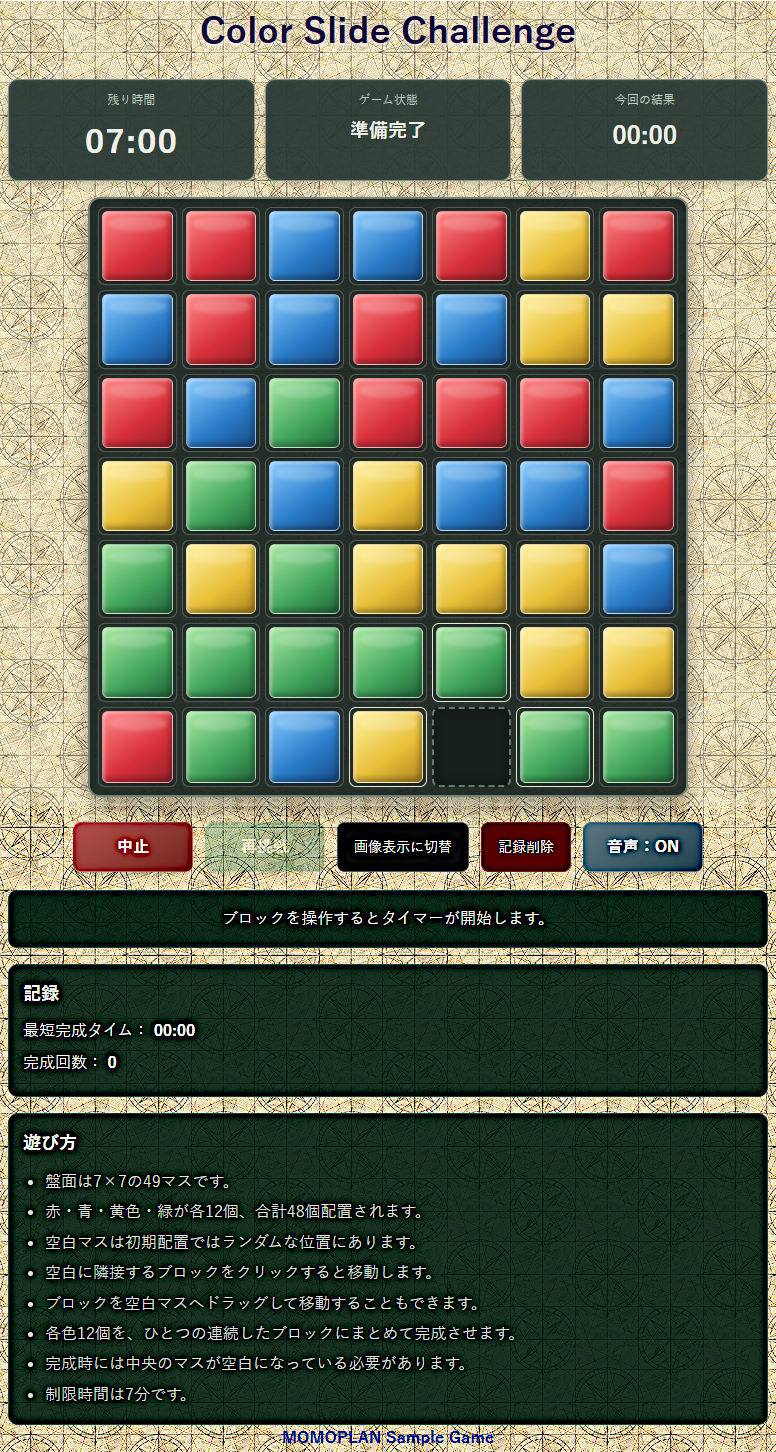
7×7の49マスの中に赤・青・黄色・緑の色または画像が各12個×4で48個の色がシャッフルで配置されている
いずれかの色または画像をマスの上下・左右に動かせて、全体マスの中央が空白になるように同色の4ブロックを成立させるゲームです。
各コードの修正・追加・変更・デザインの変更等は制限なく使用できます。しかし、管理者がデモ用として公開していますので、丸ごとコピペしてWEB公開する事は許可致しませんが、起動時のUI(ユーザーインターフェイス)を全面変更すればこの限りではありません。
音声はお借りもので、WEBで使用する場合はAmitaro's 様のクレジット表記が必要です
| 仕様 |
| ・いづれかのマスにマウスまたはドラッグ&ドロップするとタイマーがカウントダウン ・タイルの切り替え 色表示または画像 ・制限時間は7分 7分以内に完成したら完成演出 紙吹雪 ・マスの移動時は移動箇所または種類に応じで各ハイライトの表示 ・タイマーカウント0で完成しない場合は、全てのマス内の色または画像が吹っ飛ぶ演出 ・完成時は終了タイムのローカル保存(ゲームオーバー 中止の場合 00:00) ・中止ボタン(強制終了 各初期化 再シャッフル) ・再挑戦ボタン(初期化 再シャッフル) 初期起動時またはゲーム中はボタン無効 ・再挑戦ボタン ゲームオーバーまたは完成時ボタン有効 ・完成した場合の次回のスタート時間は完成時間に応じて、開始タイマーがスタート ※上書き制 ・時間内にゲームオーバーした場合は初期値7分からスタート ・音声ボタンON/OFFの切り替え ※残りタイムの音声 ・2分前 1分前 10秒前 3・2・1の各音声 ・10秒からカウントに合わせて赤で点滅 ・記録削除ボタンで、ローカルストレージの値を削除 ・表示関係は画面内のメッセージ表示(アラートは不採用) ・色表示は3D風の立体表示 ・全体画面構成は目に優しい落ち着いた色を採用 ・背景はXPD_22.PNGのリピート仕様 ※任意 ・スクロールは動作可能で非表示 ・ブラウザサイズに応じた画面調整とメディア調整 フォルダ構成(階層) -------Colors-Puzzle/ | |---index.html |---style.css |---script.js | |------sounds/ | | --- timer_2.mp3 2分 | | --- timer_1.mp3 1分 | | --- 10-seconds-ago.mp3 10秒 | | --- 3,2,1.mp3 3・2・1カウント |------img/ |---0.png 切り替え用画像 0.png~3.png |---1.png |---2.png |---3.png |---XPD_22.PNG Microsoft Expression Web 4背景画像 |
| HTML |
<!DOCTYPE html>
<html lang="ja">
<head>
  <meta charset="UTF-8">
  <meta name="viewport" content="width=device-width, initial-scale=1">
  <title>4色ブロック完成ゲーム</title>
  <link rel="stylesheet" href="style.css">
</head>
<body>

  <header class="header">
    <h1>Color Slide Challenge</h1>
  </header>

  <main class="game-container">

    <section class="status-panel">
      <div class="status-box">
        <span class="status-label">残り時間</span>
        <span id="timer" class="timer">07:00</span>
      </div>

      <div class="status-box">
        <span class="status-label">ゲーム状態</span>
        <span id="gameStatus" class="game-status">準備完了</span>
      </div>

      <div class="status-box">
        <span class="status-label">今回の結果</span>
        <span id="resultTime" class="result-time">00:00</span>
      </div>
    </section>

    <section class="board-section">
      <div id="board"
           class="board"
           role="group"
           aria-label="7行7列のゲーム盤面">
      </div>
    </section>

    <section class="controls">
      <button id="cancelButton" class="button cancel-button">
        中止
      </button>

      <button id="retryButton"
              class="button retry-button"
              disabled>
        再挑戦
      </button>

      <button id="displayModeButton" type="button">
          画像表示に切替
      </button>

      <button id="clearRecordsButton" type="button">
          記録削除
      </button>

      <button id="soundButton"
              class="button sound-button"
              aria-pressed="true">
        音声:ON
      </button>
    </section>

    <section class="message-panel">
      <p id="message" role="status" aria-live="polite">
        ブロックを操作するとタイマーが開始します。
      </p>
    </section>

    <section class="record-panel">
      <h2>記録</h2>
      <p>
        最短完成タイム:
        <strong id="bestTime">00:00</strong>
      </p>
      <p>
        完成回数:
        <strong id="winCount">0</strong>
      </p>
    </section>

    <section class="rules">
      <h2>遊び方</h2>
      <ul>
        <li>盤面は7×7の49マスです。</li>
        <li>赤・青・黄色・緑が各12個、合計48個配置されます。</li>
        <li>空白マスは初期配置ではランダムな位置にあります。</li>
        <li>空白に隣接するブロックをクリックすると移動します。</li>
        <li>ブロックを空白マスへドラッグして移動することもできます。</li>
        <li>各色12個を、ひとつの連続したブロックにまとめて完成させます。</li>
        <li>完成時には中央のマスが空白になっている必要があります。</li>
        <li>制限時間は7分です。</li>
      </ul>
    </section>

  </main>

  <audio id="sound2min"
         src="sounds/timer_2.mp3"
         preload="auto"></audio>

  <audio id="sound1min"
         src="sounds/timer_1.mp3"
         preload="auto"></audio>

  <audio id="sound10sec"
         src="sounds/10-seconds-ago.mp3"
         preload="auto"></audio>

  <audio id="sound321"
         src="sounds/3,2,1.mp3"
         preload="auto"></audio>

  <a href="https://flower-processing.net/wp/"
        style="text-decoration: none; color: #0a56a1;" target="_blank"rel="noopener">MOMOPLAN  Sample Game</a>

  <script src="script.js"></script>
</body>
</html>| script.js |
"use strict";

/* ==================================================
   4色ブロック完成ゲーム
   HTML・CSS・JavaScript 3ファイル構成
================================================== */

/* =========================
   1. 基本設定
========================= */

const CONFIG = {
  SIZE: 7, /*横7列 縦7行*/
  TOTAL: 49, /*合計*/
  CENTER: 24, /*中央空白*/
  LIMIT: 42*10000, /*タイム*/

  // 将来、画像を使用する場合は true
  USE_IMAGES: false,

  IMAGE_PATHS: [
    "0.png", /*画像使用*/
    "1.png",
    "2.png",
    "3.png"
  ],

  COLORS: [
    { name: "赤", className: "color-red" }, /*カラー色*/
    { name: "青", className: "color-blue" },
    { name: "黄色", className: "color-yellow" },
    { name: "緑", className: "color-green" }
  ],

  STORAGE_KEY: "fourColorGameRecords",

  // 完成形からのシャッフル移動回数
  SHUFFLE_MOVES: 700
};

/* =========================
   2. DOM取得
========================= */

const $ = id => document.getElementById(id);

const boardElement = $("board");
const timerElement = $("timer");
const statusElement = $("gameStatus");
const resultElement = $("resultTime");
const messageElement = $("message");

const cancelButton = $("cancelButton");
const retryButton = $("retryButton");
const soundButton = $("soundButton");

const bestTimeElement = $("bestTime");
const winCountElement = $("winCount");

const audio = {
  twoMinutes: $("sound2min"),
  oneMinute: $("sound1min"),
  tenSeconds: $("sound10sec"),
  countdown: $("sound321")
};

/* =========================
   3. ゲーム状態
========================= */

let board = [];

let started = false;
let finished = false;
let soundEnabled = true;

let startTime = 0;
let endTime = 0;

let remainingTime = CONFIG.LIMIT;

// 次の挑戦で使用する制限時間
let nextStartTime = CONFIG.LIMIT;

// 前回の終了理由
let previousResult = null;

// 前回の完成所要時間
let previousCompletionTime = null;

let timerInterval = null;
let draggedIndex = null;
let effectLayer = null;

let lastPlayedThreshold = null;

/* =========================
   4. 記録の読み込み
========================= */

function loadRecords() {
  try {
    const data = JSON.parse(
      localStorage.getItem(CONFIG.STORAGE_KEY)
    );

    if (
      data &&
      Number.isInteger(data.winCount) &&
      Array.isArray(data.times)
    ) {
      return {
        winCount: data.winCount,
        times: data.times.filter(
          time => Number.isFinite(time) && time >= 0
        )
      };
    }
  } catch (error) {
    console.warn("記録を読み込めませんでした。", error);
  }

  return {
    winCount: 0,
    times: []
  };
}

let records = loadRecords();

/* =========================
   5. 時間表示
========================= */

function formatTime(milliseconds) {
  const seconds = Math.ceil(
    Math.max(0, milliseconds) / 1000
  );

  const minutes = Math.floor(seconds / 60);
  const rest = seconds % 60;

  return (
    String(minutes).padStart(2, "0") +
    ":" +
    String(rest).padStart(2, "0")
  );
}

function elapsedTime() {
  if (!started) return 0;

  return Math.max(
    0,
    (finished ? endTime : Date.now()) - startTime
  );
}

function updateTimerDisplay() {
    const seconds = Math.ceil(remainingTime / 1000);

    const minutesText = String(Math.floor(seconds / 60))
        .padStart(2, "0");

    const secondsText = String(seconds % 60)
        .padStart(2, "0");

    timerElement.textContent =
        `${minutesText}:${secondsText}`;

    // 残り10秒から赤点滅
    timerElement.classList.toggle(
        "danger",
        seconds >= 1 && seconds <= 10
    );

    // 残り時間がある間は実際の秒数に合わせて点滅
    if (seconds >= 1 && seconds <= 10) {
        const elapsedInSecond =
            (1000 - (remainingTime % 1000)) % 1000;

        timerElement.style.opacity =
            elapsedInSecond < 500 ? "1" : "0.2";
    } else {
        timerElement.style.opacity = "1";
    }
}

/* =========================
   6. 記録の保存
========================= */

function saveRecords() {
  try {
    localStorage.setItem(
      CONFIG.STORAGE_KEY,
      JSON.stringify(records)
    );

    return true;
  } catch (error) {
    console.warn("記録を保存できませんでした。", error);

    setMessage(
      "記録を保存できませんでした。ブラウザーの保存設定をご確認ください。"
    );

    return false;
  }
}

function updateRecords() {
  const best = records.times.length
    ? Math.min(...records.times)
    : null;

  bestTimeElement.textContent =
    best === null ? "00:00" : formatTime(best);

  winCountElement.textContent = records.winCount;
}

/* =========================
   7. メッセージ表示
========================= */

function setMessage(text, type = "") {
  messageElement.textContent = text;

  messageElement.parentElement.classList.remove(
    "success",
    "failure"
  );

  if (type) {
    messageElement.parentElement.classList.add(type);
  }
}

/* ==================================================
   8. 完成形を作成

   赤・青・黄色・緑をそれぞれ12マスの
   連続したブロックにする。

   中央の24番目は空白。

   これを基準に合法的な移動を繰り返して
   シャッフルするため、完成可能な盤面になる。
================================================== */

function createSolvedBoard() {
  const result = Array(CONFIG.TOTAL).fill(null);

  for (let row = 0; row < CONFIG.SIZE; row++) {
    for (let col = 0; col < CONFIG.SIZE; col++) {
      const index = row * CONFIG.SIZE + col;

      if (row <= 2 && col <= 3) {
        // 赤:上側左の12マス
        result[index] = 0;
      } else if (row <= 3 && col >= 4) {
        // 青:上側右9マス+右端の3マス
        result[index] = 1;
      } else if (row >= 4 && col >= 3) {
        // 黄色:下側右の12マス
        result[index] = 2;
      } else if (
        (row >= 4 && col <= 2) ||
        (row === 3 && col <= 2)
      ) {
        // 緑:下側左9マス+左端の3マス
        result[index] = 3;
      }
    }
  }

  result[CONFIG.CENTER] = null;

  return result;
}

/* =========================
   9. 隣接マスの取得
========================= */

function getNeighbors(index) {
  const row = Math.floor(index / CONFIG.SIZE);
  const col = index % CONFIG.SIZE;

  const neighbors = [];

  if (row > 0) {
    neighbors.push(index - CONFIG.SIZE);
  }

  if (row < CONFIG.SIZE - 1) {
    neighbors.push(index + CONFIG.SIZE);
  }

  if (col > 0) {
    neighbors.push(index - 1);
  }

  if (col < CONFIG.SIZE - 1) {
    neighbors.push(index + 1);
  }

  return neighbors;
}

/* =========================
   10. 空白マスの検索
========================= */

function findEmpty() {
  return board.indexOf(null);
}

function isAdjacent(a, b) {
  return getNeighbors(a).includes(b);
}

/* =========================
   11. 完成可能な盤面を生成
========================= */

function createBoardData() {
  board = createSolvedBoard();

  let empty = findEmpty();
  let previousEmpty = -1;

  // 完成形から合法的な移動を繰り返す
  for (let i = 0; i < CONFIG.SHUFFLE_MOVES; i++) {
    let choices = getNeighbors(empty).filter(
      index => index !== previousEmpty
    );

    // 念のため候補がない場合は全隣接マスを使う
    if (choices.length === 0) {
      choices = getNeighbors(empty);
    }

    const from = choices[
      Math.floor(Math.random() * choices.length)
    ];

    [board[from], board[empty]] = [
      board[empty],
      board[from]
    ];

    previousEmpty = empty;
    empty = from;
  }

  // 空白マスはシャッフル後の位置に残る
  return board.slice();
}

/* =========================
   12. 盤面描画
========================= */

function renderBoard() {
  boardElement.innerHTML = "";

  board.forEach((color, index) => {
    const cell = document.createElement("button");

    cell.type = "button";
    cell.className = "cell";

    cell.dataset.index = index;

    const row = Math.floor(index / CONFIG.SIZE);
    const col = index % CONFIG.SIZE;

    cell.setAttribute(
      "aria-label",
      color === null
        ? `空白、${row + 1}行${col + 1}列`
        : `${CONFIG.COLORS[color].name}、${row + 1}行${col + 1}列`
    );

    if (color === null) {
      cell.classList.add("empty");
    } else {
      const tile = document.createElement("span");

      tile.classList.add("tile");

      if (CONFIG.USE_IMAGES) {
        tile.style.backgroundImage =
          `url("${CONFIG.IMAGE_PATHS[color]}")`;

        tile.style.backgroundPosition = "center";
        tile.style.backgroundSize = "contain";
        tile.style.backgroundRepeat = "no-repeat";
      } else {
        tile.classList.add(
          CONFIG.COLORS[color].className
        );
      }

      cell.appendChild(tile);
      cell.draggable = !finished;
    }

    // クリックしたマスでゲーム開始
    cell.addEventListener("click", () => {
      if (finished) return;

      if (!started) {
        startGame();
      }

      if (color !== null) {
        moveTile(index);
      }
    });

    // ドラッグ開始時にもゲーム開始
    cell.addEventListener("dragstart", event => {
      if (finished || color === null) {
        event.preventDefault();
        return;
      }

      if (!started) {
        startGame();
      }

      draggedIndex = index;

      event.dataTransfer.effectAllowed = "move";
      event.dataTransfer.setData(
        "text/plain",
        String(index)
      );
    });

    cell.addEventListener("dragend", () => {
      draggedIndex = null;
    });

    cell.addEventListener("dragover", event => {
      if (finished) return;

      event.preventDefault();
      event.dataTransfer.dropEffect = "move";
    });

    cell.addEventListener("drop", event => {
      event.preventDefault();

      if (finished) return;

      if (!started) {
        startGame();
      }

      const fromValue =
        event.dataTransfer.getData("text/plain");

      const from = fromValue !== ""
        ? Number(fromValue)
        : draggedIndex;

      const target = Number(cell.dataset.index);

      if (
        Number.isInteger(from) &&
        from >= 0 &&
        from < CONFIG.TOTAL
      ) {
        moveTile(from, target);
      }

      draggedIndex = null;
    });

    if (
      !finished &&
      color !== null &&
      isAdjacent(index, findEmpty())
    ) {
      cell.classList.add("movable");
    }

    boardElement.appendChild(cell);
  });
}

/* =========================
   13. ブロック移動
========================= */

function moveTile(from, dropTarget = null) {
  if (finished) return;

  if (
    !Number.isInteger(from) ||
    from < 0 ||
    from >= CONFIG.TOTAL
  ) {
    return;
  }

  if (board[from] === null) return;

  const empty = findEmpty();

  // ドラッグ時は空白マスへのドロップだけ許可
  if (
    dropTarget !== null &&
    dropTarget !== empty
  ) {
    return;
  }

  // 空白に上下左右で隣接している必要がある
  if (!isAdjacent(from, empty)) {
    return;
  }

  if (!started) {
    startGame();
  }

  // 移動先(元の空白マス)の位置を保存
  const movedTo = empty;

  // タイルを移動
  [board[from], board[empty]] = [
    board[empty],
    board[from]
  ];

  // 盤面を再描画
  renderBoard();

  // 移動先のマス枠を光らせる
  // 移動したタイルの色を取得
const movedColor = board[movedTo];

// 移動先のマスを取得
// 移動先のマスを取得
const cells = document.querySelectorAll("#board .cell");
const movedCell = cells[movedTo];

// 移動先にあるタイルを取得
const movedTile = movedCell?.querySelector(".tile");

if (movedCell && movedTile) {
  // タイルのCSSクラスから色を判定
  const tileClass = movedTile.className;

  let glowClass = "";

  if (tileClass.includes("red")) {
    glowClass = "glow-red";
  } else if (tileClass.includes("blue")) {
    glowClass = "glow-blue";
  } else if (
    tileClass.includes("yellow")
  ) {
    glowClass = "glow-yellow";
  } else if (tileClass.includes("green")) {
    glowClass = "glow-green";
  }

  // 前回の発光を解除
  movedCell.classList.remove(
    "glow-red",
    "glow-blue",
    "glow-yellow",
    "glow-green"
  );

  if (glowClass) {
    // アニメーションを再実行
    void movedCell.offsetWidth;

    movedCell.classList.add(glowClass);

    setTimeout(() => {
      movedCell.classList.remove(glowClass);
    }, 500);
  }
}

  // 完成判定
  if (checkCompletion()) {
    finishGame(true);
  }
}

/* =========================
   14. ゲーム開始
========================= */

function startGame() {
  if (started || finished) return;

  started = true;
  startTime = Date.now();

  // 再挑戦時も、その時点の残り時間を基準にする
  const initialTime = remainingTime;

  statusElement.textContent = "プレイ中";

  setMessage(
    "ゲーム開始!4色のブロックを完成させましょう。"
  );

  timerInterval = setInterval(() => {
    if (!started || finished) return;

    remainingTime = Math.max(
      0,
      initialTime - (Date.now() - startTime)
    );

    updateTimerDisplay();
    checkTimeSignals();

    if (remainingTime <= 0) {
      finishGame(false);
    }
  }, 50);

  updateTimerDisplay();
}

/* =========================
   15. 残り時間の音声
========================= */

function checkTimeSignals() {
  if (!soundEnabled || !started || finished) {
    return;
  }

  const seconds = Math.ceil(remainingTime / 1000);

  if (
    seconds <= 120 &&
    seconds > 60 &&
    lastPlayedThreshold !== 120
  ) {
    lastPlayedThreshold = 120;
    playSound(audio.twoMinutes);
  }

  if (
    seconds <= 60 &&
    seconds > 10 &&
    lastPlayedThreshold !== 60
  ) {
    lastPlayedThreshold = 60;
    playSound(audio.oneMinute);
  }

  if (
    seconds <= 10 &&
    seconds > 3 &&
    lastPlayedThreshold !== 10
  ) {
    lastPlayedThreshold = 10;
    playSound(audio.tenSeconds);
  }

  if (
    seconds <= 3 &&
    seconds > 0 &&
    lastPlayedThreshold !== 3
  ) {
    lastPlayedThreshold = 3;
    playSound(audio.countdown);
  }
}

function playSound(sound) {
  if (!soundEnabled || !sound) return;

  sound.currentTime = 0;

  const result = sound.play();

  if (result && typeof result.catch === "function") {
    result.catch(error => {
      console.warn(
        "音声を再生できませんでした。",
        error
      );
    });
  }
}

/* =========================
   16. 音声 ON / OFF
========================= */

soundButton.addEventListener("click", () => {
  soundEnabled = !soundEnabled;

  soundButton.textContent = soundEnabled
    ? "音声:ON"
    : "音声:OFF";

  soundButton.setAttribute(
    "aria-pressed",
    String(soundEnabled)
  );

  if (!soundEnabled) {
    Object.values(audio).forEach(sound => {
      sound.pause();
      sound.currentTime = 0;
    });

    setMessage("音声をOFFにしました。");
  } else {
    setMessage("音声をONにしました。");
  }
});

/* ==================================================
   17. 完成判定

   ・中央は空白
   ・各色12マス
   ・各色の12マスがひとつにつながっている
================================================== */

function checkCompletion() {
  if (board.length !== CONFIG.TOTAL) {
    return false;
  }

  // 中央の空白を確認
  if (board[CONFIG.CENTER] !== null) {
    return false;
  }

  // 各色12マスを確認
  const counts = [0, 0, 0, 0];

  board.forEach(color => {
    if (color !== null) {
      counts[color]++;
    }
  });

  if (!counts.every(count => count === 12)) {
    return false;
  }

  // 各色の連結成分を調べる
  for (let color = 0; color < 4; color++) {
    const cells = [];

    board.forEach((value, index) => {
      if (value === color) {
        cells.push(index);
      }
    });

    if (cells.length !== 12) {
      return false;
    }

    const visited = new Set();
    const queue = [cells[0]];

    visited.add(cells[0]);

    while (queue.length > 0) {
      const current = queue.shift();

      for (const next of getNeighbors(current)) {
        if (
          board[next] === color &&
          !visited.has(next)
        ) {
          visited.add(next);
          queue.push(next);
        }
      }
    }

    // 12マスすべてが連続していること
    if (visited.size !== 12) {
      return false;
    }
  }

  return true;
}

/* =========================
   18. ゲーム終了
========================= */

function finishGame(success) {
  if (finished) return;

  endTime = Date.now();

  const elapsed = started
    ? Math.max(0, endTime - startTime)
    : 0;

  finished = true;
  started = false;

  clearInterval(timerInterval);
  timerInterval = null;

  retryButton.disabled = false;
  cancelButton.disabled = true;

  timerElement.classList.remove("danger");

  if (success) {
    // 完成時の所要時間を保存
    previousCompletionTime = Math.min(
      nextStartTime,
      elapsed
    );

    previousResult = "success";

    // 次回の制限時間は今回の完成タイム
    nextStartTime = previousCompletionTime;

    remainingTime = Math.max(
      0,
      nextStartTime - elapsed
    );

    resultElement.textContent =
      formatTime(previousCompletionTime);

    statusElement.textContent = "完成!";

    setMessage(
      `完成おめでとうございます!タイム:${formatTime(previousCompletionTime)}`,
      "success"
    );

    records.winCount++;
    records.times.push(previousCompletionTime);

    saveRecords();
    updateRecords();

    renderBoard();
    showConfetti();
  } else {
    previousResult = "gameover";
    previousCompletionTime = null;

    // ゲームオーバー後の次回は10分
    nextStartTime = CONFIG.LIMIT;

    remainingTime = 0;

    resultElement.textContent = "00:00";

    statusElement.textContent = "ゲームオーバー";

    setMessage(
      "時間切れです。再挑戦ボタンでもう一度挑戦できます。",
      "failure"
    );

    renderBoard();
    showExplosion();
  }

  updateTimerDisplay();
}

/* =========================
   19. 中止ボタン
========================= */

cancelButton.addEventListener("click", () => {
  if (finished) return;

  clearInterval(timerInterval);
  timerInterval = null;

  started = false;
  finished = true;

  previousResult = "cancel";
  previousCompletionTime = null;

  // 中止後は次回10分
  nextStartTime = CONFIG.LIMIT;
  remainingTime = 0;

  resultElement.textContent = "00:00";
  statusElement.textContent = "中止";

  timerElement.classList.remove("danger");

  // 中止時は盤面を再シャッフル
  board = createBoardData();

  cancelButton.disabled = true;
  retryButton.disabled = false;

  renderBoard();
  updateTimerDisplay();

  setMessage(
    "ゲームを中止しました。再挑戦ボタンで新しいゲームを始められます。"
  );
});

/* =========================
   20. 再挑戦ボタン
========================= */

retryButton.addEventListener("click", () => {
  if (!finished) return;

  // 完成後:前回の完成時間から
  // ゲームオーバー・中止後:10分から
  if (previousResult === "success") {
    nextStartTime = previousCompletionTime;
  } else {
    nextStartTime = CONFIG.LIMIT;
  }

  initializeGame();

  setMessage(
    `新しい盤面を用意しました。残り時間 ${formatTime(remainingTime)}。ブロックを操作すると計測が始まります。`
  );
});

/* =========================
   21. 初期化
========================= */

function initializeGame() {
  clearInterval(timerInterval);
  timerInterval = null;

  Object.values(audio).forEach(sound => {
    sound.pause();
    sound.currentTime = 0;
  });

  started = false;
  finished = false;

  startTime = 0;
  endTime = 0;

  remainingTime = nextStartTime;

  draggedIndex = null;
  lastPlayedThreshold = null;

  board = createBoardData();

  timerElement.classList.remove("danger");

  timerElement.textContent = formatTime(remainingTime);
  resultElement.textContent = "00:00";

  statusElement.textContent = "準備完了";

  cancelButton.disabled = false;
  retryButton.disabled = true;

  renderBoard();
  updateRecords();
}

/* =========================
   22.画像・カラー切り替え
========================= */

const displayModeButton =
    document.getElementById("displayModeButton");


let imageMode = false;

displayModeButton.addEventListener("click", () => {
    imageMode = !imageMode;

    boardElement.classList.toggle(
        "image-mode",
        imageMode
    );

    displayModeButton.textContent = imageMode
        ? "カラー表示に切替"
        : "画像表示に切替";
});

/* =========================
   23. 演出レイヤー
========================= */

function createEffectLayer() {
  if (effectLayer) {
    effectLayer.remove();
  }

  effectLayer = document.createElement("div");
  effectLayer.className = "effect-layer";

  document.body.appendChild(effectLayer);

  return effectLayer;
}

/* =========================
   24. 完成時の紙吹雪
========================= */

function showConfetti() {
  const layer = createEffectLayer();

  const rect = boardElement.getBoundingClientRect();

  const colors = [
    "#ff5252",
    "#448aff",
    "#ffdf4d",
    "#4caf50",
    "#ffffff",
    "#ff8c42"
  ];

  for (let i = 0; i < 180; i++) {
    const piece = document.createElement("span");

    piece.className = "confetti";

    // 盤面内を中心に紙吹雪を発生
    piece.style.left =
      rect.left + Math.random() * rect.width + "px";

    piece.style.top =
      rect.top + Math.random() * rect.height * 0.25 + "px";

    piece.style.backgroundColor =
      colors[Math.floor(Math.random() * colors.length)];

    piece.style.setProperty(
      "--drift",
      (Math.random() * 400 - 200) + "px"
    );

    piece.style.setProperty(
      "--duration",
      (2 + Math.random() * 3) + "s"
    );

    layer.appendChild(piece);
  }

  setTimeout(() => {
    if (layer.isConnected) {
      layer.remove();
    }
  }, 6000);
}

/* =========================
   25. ゲームオーバー演出

   49マスの盤面にある色ブロックを
   それぞれの現在位置から飛ばす。
========================= */

function showExplosion() {
    const tiles = Array.from(
        document.querySelectorAll("#board .tile")
    );

    // 49マスの色付きタイルが存在しない場合は終了
    if (tiles.length === 0) {
        return;
    }

    tiles.forEach((tile, index) => {
        // 各タイルの現在の画面上の位置と大きさを取得
        const rect = tile.getBoundingClientRect();

        // 表示されている位置から複製を作成
        const flyingTile = tile.cloneNode(true);

        // 元のマスと同じ位置・大きさに固定
        flyingTile.style.position = "fixed";
        flyingTile.style.left = `${rect.left}px`;
        flyingTile.style.top = `${rect.top}px`;
        flyingTile.style.width = `${rect.width}px`;
        flyingTile.style.height = `${rect.height}px`;
        flyingTile.style.margin = "0";
        flyingTile.style.boxSizing = "border-box";
        flyingTile.style.zIndex = "99999";
        flyingTile.style.pointerEvents = "none";
        flyingTile.style.opacity = "1";
        flyingTile.style.visibility = "visible";
        flyingTile.style.transform = "none";

        // body直下に配置し、親要素の座標の影響を受けないようにする
        document.body.appendChild(flyingTile);

        // 元のマスのタイルだけを隠す
        tile.style.visibility = "hidden";

        // タイルごとに違う方向へ吹き飛ばす
        const angle = Math.random() * Math.PI * 2;
        const distance = 250 + Math.random() * 500;
        const moveX = Math.cos(angle) * distance;
        const moveY = Math.sin(angle) * distance;
        const rotate = (Math.random() - 0.5) * 1800;

        // 現在位置から外側へ飛び、縮小して消える
        const animation = flyingTile.animate(
            [
                {
                    transform: "translate(0, 0) rotate(0deg) scale(1)",
                    opacity: 1
                },
                {
                    transform:
                        `translate(${moveX}px, ${moveY}px) ` +
                        `rotate(${rotate}deg) scale(0.1)`,
                    opacity: 0
                }
            ],
            {
                duration: 900 + Math.random() * 400,
                easing: "cubic-bezier(0.2, 0.7, 0.4, 1)",
                fill: "forwards",
                delay: Math.random() * 100
            }
        );

        // アニメーション終了後に複製を削除
        animation.onfinish = () => {
            flyingTile.remove();
        };
    });
}

/* =========================
   26.ローカル記録削除
========================= */

const clearRecordsButton =
    document.getElementById("clearRecordsButton");

clearRecordsButton.addEventListener("click", () => {
    // 1. ローカル記録を削除
    localStorage.removeItem("fourColorGameRecords");

    // 2. 記録表示を初期状態に戻す
    if (typeof updateRecordsDisplay === "function") {
        updateRecordsDisplay();
    }

    // 3. ベストタイムを初期状態に戻す
    const bestTimeElement =
        document.getElementById("bestTime");

    if (bestTimeElement) {
        bestTimeElement.textContent = "00:00";
    }

    // 4. 完成回数を初期状態に戻す
    const winCountElement =
        document.getElementById("winCount");

    if (winCountElement) {
        winCountElement.textContent = "0";
    }

    // 5. メッセージを表示
    const messageElement =
        document.getElementById("message");

    if (messageElement) {
        messageElement.textContent =
            "ローカル記録を削除しました。";
    }
});

/* =========================
   27. 起動
========================= */

initializeGame();| style.css |
/* =========================
   基本設定
========================= */

:root {
  --background: #27312f;
  --panel: #35413d;
  --text: #f0f2e9;
  --muted: #c4cec5;
  --accent: #b5c9b1;
  --danger: #ff5151;
  --cell-gap: 5px;
}

* {
  box-sizing: border-box;
}

html {
  min-height: 100%;
  scrollbar-width: none;
}

html::-webkit-scrollbar,
body::-webkit-scrollbar {
  display: none;
}

body {
  margin: 0;
  min-height: 100vh;
  padding: 16px;
  background-color: var(--background);
  background-image: url("img/XPD_22.PNG");
  background-repeat: repeat;
  color: var(--text);
  font-family: "Yu Gothic", "Meiryo", sans-serif;
  text-align: center;
  overflow-y: auto;
  scrollbar-width: none;
}

button {
  font: inherit;
}

/* =========================
   ヘッダー
========================= */

.header {
  margin: 0 auto 18px;
  max-width: 900px;
}

.header h1 {
  margin: 0;
  font-size: clamp(23px, 4vw, 36px);
  color: #0d0435;
  text-shadow: 0 2px 4px rgba(252, 244, 244, 0.945);
}

.subtitle {
  margin: 8px 0 0;
  color: var(--muted);
  font-size: 14px;
}

/* =========================
   全体レイアウト
========================= */

.game-container {
  width: min(100%, 760px);
  margin: 0 auto;
}

.status-panel {
  display: grid;
  grid-template-columns: repeat(3, minmax(0, 1fr));
  gap: 10px;
  margin-bottom: 16px;
}

.status-box {
  min-width: 0;
  padding: 10px 5px;
  border: 1px solid #82918a;
  border-radius: 10px;
  background: #283632eF;
  box-shadow:
    inset 0 1px 3px #ffffff12,
    0 3px 6px #0003;
}

.status-label {
  display: block;
  margin-bottom: 5px;
  color: var(--muted);
  font-size: 12px;
}

.timer,
.game-status,
.result-time {
  display: block;
  font-weight: bold;
  overflow-wrap: anywhere;
}

.timer {
  font-size: clamp(23px, 5vw, 34px);
  font-variant-numeric: tabular-nums;
  letter-spacing: 1px;
}

.game-status {
  font-size: clamp(14px, 3vw, 19px);
}

.result-time {
  font-size: clamp(18px, 4vw, 25px);
  font-variant-numeric: tabular-nums;
}

/* =========================
   残り10秒の警告
========================= */

.timer.danger {
    color: #ff2222;
}

/* =========================
   ゲーム盤面
========================= */

.board-section {
  width: 100%;
  margin: 0 auto;
}

.board {
  display: grid;
  grid-template-columns: repeat(7, minmax(0, 1fr));
  gap: var(--cell-gap);
  width: min(100%, 600px);
  aspect-ratio: 1;
  margin: 0 auto;
  padding: 8px;
  border: 2px solid #71817a;
  border-radius: 12px;
  background: #17231feF;
  box-shadow:
    0 8px 18px #0005,
    inset 0 2px 5px #0005;
}

/* 各マス */

.cell {
  position: relative;
  display: flex;
  align-items: center;
  justify-content: center;
  min-width: 0;
  min-height: 0;
  padding: 0;
  overflow: hidden;
  border: 1px solid #ffffff32;
  border-radius: 7px;
  background: #26322d;
  box-shadow:
    inset 0 2px 4px #0005,
    0 1px 2px #ffffff0a;
  cursor: pointer;
  touch-action: manipulation;
  user-select: none;
  -webkit-user-select: none;
}

.cell:focus-visible {
  outline: 3px solid #fff;
  outline-offset: -3px;
}

.cell.movable {
  border-color: #e3ead2;
}

.cell.movable:hover {
  filter: brightness(1.14);
}

.cell:active {
  filter: brightness(0.92);
}

/* 空白マス */

.cell.empty {
  background: #17201d;
  border: 2px dashed #697970;
  box-shadow: inset 0 0 12px #0008;
  cursor: default;
}

/* =========================
   立体的な色ブロック
========================= */

.tile {
  position: absolute;
  inset: 3px;
  display: flex;
  align-items: center;
  justify-content: center;
  border: 1px solid #ffffff75;
  border-radius: 6px;
  box-shadow:
    inset 2px 2px 3px #ffffff58,
    inset -3px -4px 5px #0004,
    0 3px 3px #0005;
  transition:
    transform 0.12s ease,
    filter 0.12s ease;
}

.tile::after {
  content: "";
  position: absolute;
  top: 4px;
  left: 5px;
  right: 5px;
  height: 22%;
  border-radius: 50%;
  background: #ffffff32;
  filter: blur(2px);
  pointer-events: none;
}

.color-red {
  background: linear-gradient(145deg, #ff8585, #d72f39 60%, #98202b);
}

.color-blue {
  background: linear-gradient(145deg, #88caff, #287bc7 60%, #194a87);
}

.color-yellow {
  background: linear-gradient(145deg, #fff2a0, #e8bf38 60%, #ad8420);
}

.color-green {
  background: linear-gradient(145deg, #a9e7a0, #42a65c 60%, #22663b);
}

/* =========================
   操作ボタン
========================= */

.controls {
  display: flex;
  justify-content: center;
  flex-wrap: wrap;
  gap: 12px;
  margin: 18px 0;
}

.button {
  min-width: 120px;
  padding: 11px 20px;
  border: 1px solid #ffffff35;
  border-radius: 8px;
  color: #fff;
  font-weight: bold;
  cursor: pointer;
  box-shadow: 0 3px 5px #0003;
  transition:
    transform 0.12s ease,
    filter 0.12s ease;
}

.button:hover:not(:disabled) {
  filter: brightness(1.12);
  transform: translateY(-1px);
}

.button:active:not(:disabled) {
  transform: translateY(1px);
}

.button:disabled {
  opacity: 0.38;
  cursor: not-allowed;
}

.cancel-button {
  background: linear-gradient(145deg, #b75d58, #793b39);
}

.retry-button {
  background: linear-gradient(145deg, #629c73, #356847);
}

.sound-button {
  background: linear-gradient(145deg, #677e89, #3a505a);
}

/* =========================
   メッセージ
========================= */

.message-panel {
  min-height: 58px;
  display: flex;
  align-items: center;
  justify-content: center;
  padding: 10px;
  border: 1px solid #64756a;
  border-radius: 9px;
  background: #26352fef;
}

.message-panel p {
  margin: 0;
  line-height: 1.7;
  overflow-wrap: anywhere;
}

.message-panel.success {
  color: #c8f5b9;
  border-color: #78b57b;
}

.message-panel.failure {
  color: #ffb1a7;
  border-color: #c96b62;
}

/* =========================
   記録・説明
========================= */

.record-panel,
.rules {
  margin-top: 16px;
  padding: 14px;
  border: 1px solid #64756a;
  border-radius: 10px;
  background: #293832ed;
  text-align: left;
}

.record-panel h2,
.rules h2 {
  margin: 0 0 10px;
  font-size: 18px;
}

.record-panel p {
  margin: 6px 0;
}

.rules ul {
  margin: 0;
  padding-left: 22px;
  line-height: 1.9;
  color: var(--muted);
}

/* =========================
   演出用レイヤー
========================= */

.effect-layer {
  position: fixed;
  inset: 0;
  z-index: 100;
  overflow: hidden;
  pointer-events: none;
}

.confetti {
  position: absolute;
  top: -20px;
  width: 10px;
  height: 16px;
  animation: confettiFall var(--duration, 3s) linear forwards;
}

/* =========================
   画像・カラー切り替え
========================= */

#displayModeButton {
    padding: 10px 16px;
    border: 1px solid #777;
    border-radius: 8px;
    background: #333;
    color: #fff;
    font-size: 14px;
    cursor: pointer;
    transition: background 0.2s;
}

#displayModeButton:hover {
    background: #505050;
}

/* 画像表示:赤 */
#board.image-mode .tile.color-red {
    background-color: transparent !important;
    background-image: url("img/0.png");
    background-position: center;
    background-repeat: no-repeat;
    background-size: contain;
}

/* 画像表示:青 */
#board.image-mode .tile.color-blue {
    background-color: transparent !important;
    background-image: url("img/1.png");
    background-position: center;
    background-repeat: no-repeat;
    background-size: contain;
}

/* 画像表示:黄色 */
#board.image-mode .tile.color-yellow {
    background-color: transparent !important;
    background-image: url("img/2.png");
    background-position: center;
    background-repeat: no-repeat;
    background-size: contain;
}

/* 画像表示:緑 */
#board.image-mode .tile.color-green {
    background-color: transparent !important;
    background-image: url("img/3.png");
    background-position: center;
    background-repeat: no-repeat;
    background-size: contain;
}

#clearRecordsButton {
    padding: 10px 16px;
    border: 1px solid #a44;
    border-radius: 8px;
    background: #632f2f;
    color: #fff;
    font-size: 14px;
    cursor: pointer;
}

#clearRecordsButton:hover {
    background: #853d3d;
}

a {
    font-weight: bold;
}

/* 共通:移動直後の発光 */
#board .cell.glow-red,
#board .cell.glow-blue,
#board .cell.glow-yellow,
#board .cell.glow-green {
    position: relative;
    z-index: 2;
    animation: colorGlow 0.45s ease-out;
}

/* 赤 */
#board .cell.glow-red {
    --glow-color: #ff3030;
}

/* 青 */
#board .cell.glow-blue {
    --glow-color: #35aaff;
}

/* 黄色 */
#board .cell.glow-yellow {
    --glow-color: #ffe34d;
}

/* 緑 */
#board .cell.glow-green {
    --glow-color: #40ff85;
}

/* 発光アニメーション */
@keyframes colorGlow {
    0% {
        outline: 3px solid var(--glow-color);
        outline-offset: -3px;
        box-shadow:
            0 0 8px var(--glow-color),
            0 0 18px var(--glow-color),
            inset 0 0 10px var(--glow-color);
    }

    50% {
        outline: 3px solid var(--glow-color);
        outline-offset: -3px;
        box-shadow:
            0 0 14px var(--glow-color),
            0 0 28px var(--glow-color),
            0 0 40px var(--glow-color),
            inset 0 0 14px var(--glow-color);
    }

    100% {
        outline: 0 solid transparent;
        box-shadow: none;
    }
}

@keyframes confettiFall {
  to {
    transform:
      translate3d(var(--drift, 0px), 110vh, 0)
      rotate(900deg);
    opacity: 0;
  }
}

.flying-tile {
  animation: tileFly 0.8s ease-in forwards;
}

@keyframes tileFly {
  to {
    transform:
      translate(var(--fly-x), var(--fly-y))
      rotate(var(--fly-rotate))
      scale(0.2);
    opacity: 0;
  }
}

/* =========================
   スマートフォン対応
========================= */

@media (max-width: 480px) {
  body {
    padding: 8px;
  }

  .status-panel {
    gap: 5px;
  }

  .status-box {
    padding: 8px 3px;
  }

  .board {
    gap: 3px;
    padding: 5px;
  }

  .cell {
    border-radius: 4px;
  }

  .tile {
    inset: 2px;
    border-radius: 3px;
  }

  .controls {
    gap: 8px;
  }

  .button {
    min-width: 95px;
    padding: 10px 12px;
  }
}

@media (prefers-reduced-motion: reduce) {
  .timer.danger {
    animation-duration: 1.5s;
  }

  .tile,
  .button {
    transition: none;
  }
}| 画像に関して |
| Microsoft Expression Web(マイクロソフト エクスプレッションウェブ)は、かつてマイクロソフトが開発し提供していたWebオーサリングツールです。 2012年12月20日、開発終了を発表。最終版となるExpression Web 4 SP2を無償公開しています。 |
デモ用はゲームオーバー用のアクション表示GAME OVERが表示され、さらに1ブロック12マスが揃うとブロック枠がハイライトされます。