
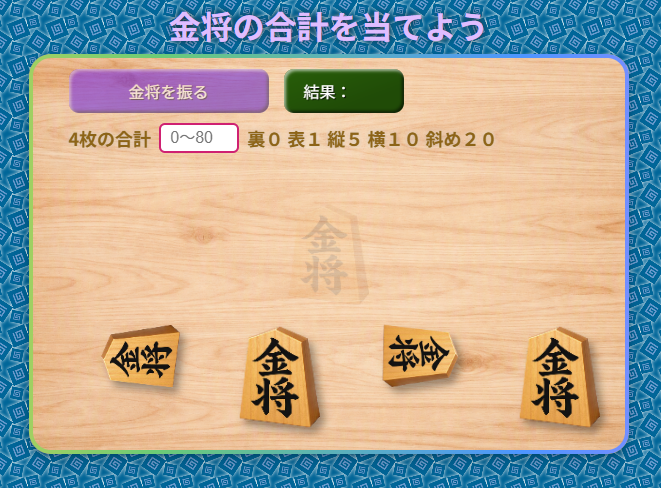
サイコロ振りに続いて第2弾、周り将棋用の駒振りコードです。この素材は駒を落として金将画像の裏・表・縦・横・斜めになった設定数字を合計するコードを分かりやすくキャンバス上に埋め込んで作りました。また駒を振って落とす関数部分をコピーして目的に合ったプログラムに入れる事も可能です。
JSコード教材用として、今回は全ての行に分かりやすくコメントいたしました。なので、題名もJSコード素材としています。ご興味のある方はご活用してください。
| HTML |
<!DOCTYPE html>
<html lang="ja">
<head>
<meta charset="UTF-8">
<meta name="viewport" content="width=device-width, initial-scale=1.0">
<title>金将の合計を当てよう</title>
<link rel="stylesheet" href="style.css">
</head>

<body>
<div id="startTitle">金将の合計を当てよう</div>
<div id="game-area">

    <canvas id="diceCanvas" width="600" height="400"></canvas>

    <div id="dice-controls">
        <div class="control-row">
            <button id="rollBtn">金将を振る</button>
            <div id="result">結果:</div>
        </div>

        <div class="guess-row">

            <label for="targetNumber">4枚の合計</label>
            <input type="number"id="targetNumber"min="0"max="80"placeholder="0~80">
            <div>裏0 表1 縦5 横10 斜め20</div>
            <div id="judgement"></div>
        </div>
    </div>
</div>

<script src="main.js"></script>
</body>
</html>| JS |
/*================大まかな流れ==================================
金将振り駒コードの説明
待機
↓
手が動く
↓
金将が空中を飛ぶ
↓
バウンドする
↓
地面を滑る
↓
4枚が所定の位置へ移動
↓
合計値を計算
↓
答えを判定
↓
正解なら紙吹雪
"idle" "hand" "air" "bounce" "ground" "settling" "done"
================大まかな流れ==================================*/
// ① HTMLの要素を取得する
// ============================================================
// HTMLにある id="diceCanvas" のCanvasを取得する
// Canvasは、金将や背景などをJavaScriptで描画する場所
const canvas = document.getElementById("diceCanvas");
// Canvasに2Dで絵を描くための「描画用オブジェクト」を取得する
// ctxを使って、画像を表示したり、図形を描いたりする
const ctx = canvas.getContext("2d");
// HTMLにある「金将を振る」ボタンを取得する
const rollBtn = document.getElementById("rollBtn");
// 結果を表示するHTML要素を取得する
const result = document.getElementById("result");
// プレイヤーが合計を入力する入力欄を取得する
const targetNumber = document.getElementById("targetNumber");
// 「あたり」「はずれ」などの判定結果を表示する要素を取得する
const judgement = document.getElementById("judgement");
// Canvasの横幅を取得する
// HTMLでは width="600" になっている
const CANVAS_WIDTH = canvas.width;
// Canvasの高さを取得する
// HTMLでは height="400" になっている
const CANVAS_HEIGHT = canvas.height;
// ② 金将の画像と、それぞれの得点を設定する
// ============================================================
// 金将には、裏・表・縦・横・斜めの5種類がある
//
// name → JavaScript内部で使う名前
// value → その金将が表す数字
// src → 使用する画像ファイルの場所
// img/フォルダー名・画像名は環境に応じて
const GOLD_IMAGES = [
// 裏向き
// 裏は「0」
{ name: "back", value: 0, src: "img/back.png" },
// 表向き
// 表は「1」
{ name: "face", value: 1, src: "img/face.png" },
// 縦向き
// 縦は「5」
{ name: "g01", value: 5, src: "img/g01.png" },
// 横向き
// 横は「10」
{ name: "g01-x", value: 10, src: "img/g01-x.png" },
// 斜め向き
// 斜めは「20」
{ name: "g01-y", value: 20, src: "img/g01-y.png" }
];
// ③ 金将の画像を読み込む
// ============================================================
// GOLD_IMAGESのそれぞれについて画像を準備する
//
// map()を使うことで、配列の中身を1つずつ処理できる
const loadedImages = GOLD_IMAGES.map(item => {
// 新しい画像オブジェクトを作る
const img = new Image();
// 画像ファイルの場所を指定する
// ここで画像の読み込みが始まる
img.src = item.src;
// 元のデータに、作成した画像オブジェクトを追加して返す
return {
...item,
img
};
});
// Canvasの背景画像を読み込む
const backgroundImg = new Image();
// img/フォルダー名は環境に応じて
backgroundImg.src = "img/background.png";
// Canvas中央に薄く表示する金将の画像を読み込む
const centerGoldImg = new Image();
// img/フォルダー名・画像名は環境に応じて
centerGoldImg.src = "img/g01.png";
// ④ 金将の大きさや最終的な位置を設定する
// ============================================================
// 金将1枚の最大横幅
const GOLD_MAX_WIDTH = 82;
// 金将1枚の最大高さ
const GOLD_MAX_HEIGHT = 105;
// Canvas下端からどのくらい余白を取るか
const BOTTOM_MARGIN = 25;
// 4枚の金将を最終的に並べるX座標
// 1枚目 → 70
// 2枚目 → 210
// 3枚目 → 350
// 4枚目 → 490
const FINAL_X = [70, 210, 350, 490];
// 4枚とも最終的なY座標は270
const FINAL_Y = 270;
// ⑤ ゲームの状態を管理する変数
// ============================================================
// stateは現在のゲーム状態を表す
//
// idle → 待機中
// hand → 手のアニメーション中
// air → 金将が空中を飛んでいる
// bounce → 金将が跳ねている
// ground → 地面を滑っている
// settling → 最終位置に移動している
// done → 結果が確定した
let state = "idle";
// 現在動いている4枚の金将を入れる配列
let goldPieces = [];
// 最終的に表示する4枚の金将を入れる配列
let finalPieces = [];
// 4枚の金将の合計値
let finalTotal = 0;
// 手のアニメーションを開始した時刻
let handStartTime = 0;
// 手のアニメーション時間
// 600ミリ秒 = 0.6秒
const HAND_DURATION = 600;
// 紙吹雪を入れる配列
let confetti = [];
// 紙吹雪を表示しているかどうか
let confettiStarted = false;
// ⑥ 画像の大きさを計算する関数
// ============================================================
function getImageSize(image) {
// 元画像の横幅を取得する
// naturalWidthが取得できなかった場合は348を使用する
const sourceWidth = image.naturalWidth || 348;
// 元画像の高さを取得する
// naturalHeightが取得できなかった場合は446を使用する
const sourceHeight = image.naturalHeight || 446;
// 横幅と高さの両方が最大サイズを超えないように
// 縦横比を保ったまま縮小するための倍率を計算する
const scale = Math.min(
GOLD_MAX_WIDTH / sourceWidth,
GOLD_MAX_HEIGHT / sourceHeight
);
// 計算した倍率を使って、実際に表示するサイズを返す
return {
width: sourceWidth * scale,
height: sourceHeight * scale
};
}
// ⑦ ランダムな金将を1枚選ぶ関数
// ============================================================
function randomGold() {
// 0~「画像の枚数未満」のランダムな整数を作る
//
// Math.random()
// → 0以上1未満のランダムな数字
//
// loadedImages.length
// → 現在は5種類なので「5」
//
// Math.floor()
// → 小数点以下を切り捨てる
const index = Math.floor(
Math.random() * loadedImages.length
);
// 選ばれた金将のデータをコピーして返す
return {
...loadedImages[index]
};
}
// ⑧ 角度を-π~πの範囲に整える関数
// ============================================================
function normalizeAngle(angle) {
// 円1周分の角度を計算する
// 2π = 360度
const twoPi = Math.PI * 2;
// 角度が大きくなりすぎたり小さくなったりしないように
// -π~πの範囲に変換して返す
return (
((angle + Math.PI) % twoPi + twoPi) % twoPi
- Math.PI
);
}
// ⑨ アニメーションを滑らかにするための関数
// ============================================================
function easeOutCubic(t) {
// 最初は速く、最後はゆっくりになる動きを作る
return 1 - Math.pow(1 - t, 3);
}
// ⑩ Canvasの背景を描画する
// ============================================================
function drawBackground() {
// 前のフレームの絵を全部消す
ctx.clearRect(
0,
0,
CANVAS_WIDTH,
CANVAS_HEIGHT
);
// 背景画像の読み込みが完了しているか確認する
if (
backgroundImg.complete &&
backgroundImg.naturalWidth
) {
// 背景画像をCanvas全体に表示する
ctx.drawImage(
backgroundImg,
0,
0,
CANVAS_WIDTH,
CANVAS_HEIGHT
);
} else {
// 背景画像がまだ読み込まれていない場合は
// 灰色でCanvasを塗りつぶす
ctx.fillStyle = "#d8d8d8";
ctx.fillRect(
0,
0,
CANVAS_WIDTH,
CANVAS_HEIGHT
);
}
// 中央の金将画像が読み込まれているか確認する
if (
centerGoldImg.complete &&
centerGoldImg.naturalWidth
) {
// 金将の表示サイズを計算する
const size = getImageSize(centerGoldImg);
// 現在のCanvasの設定を保存する
// 後でrestore()を使って元に戻せる
ctx.save();
// 金将を薄く表示する
// 0 → 完全透明
// 1 → 完全不透明
ctx.globalAlpha = 0.12;
// Canvas中央に金将を表示する
ctx.drawImage(
centerGoldImg,
CANVAS_WIDTH / 2 - size.width / 2,
CANVAS_HEIGHT / 2 - size.height / 2,
size.width,
size.height
);
// 保存しておいたCanvasの設定に戻す
ctx.restore();
}
}
// ⑪ 金将を1枚描画する関数
// ============================================================
function drawGold(piece, angle = piece.angle) {
// 金将のデータが存在しない場合は何もしない
if (!piece || !piece.data) return;
// 金将の画像を取得する
const img = piece.data.img;
// 画像がまだ読み込まれていない場合は何もしない
if (!img.complete || !img.naturalWidth) return;
// 金将を表示するサイズを計算する
const size = getImageSize(img);
// Canvasの現在の設定を保存する
ctx.save();
// 金将の中心を基準にして描画できるように
// 座標の原点を金将の中心へ移動する
ctx.translate(
piece.x + size.width / 2,
piece.y + size.height / 2
);
// 金将を指定された角度だけ回転させる
ctx.rotate(angle);
// 金将に影を付ける
ctx.shadowColor = "rgba(0, 0, 0, 0.35)";
ctx.shadowBlur = 8;
ctx.shadowOffsetX = 5;
ctx.shadowOffsetY = 6;
// 金将の画像を描画する
// 中心を0,0として描画する
ctx.drawImage(
img,
-size.width / 2,
-size.height / 2,
size.width,
size.height
);
// Canvasの設定を元に戻す
ctx.restore();
}
// ⑫ 金将を投げる前の「手」のアニメーション
// ============================================================
function drawHand(progress) {
// 手をCanvas右側に表示するためのX座標
const x = canvas.width - 45;
// 手を上下に少し揺らす
// sin()を使うことで自然な往復運動を作る
const y =
55 +
Math.sin(progress * Math.PI * 4) * 8;
// 手を少し回転させて揺れているように見せる
const angle =
Math.PI / 2 +
Math.sin(progress * Math.PI * 4) * 0.18;
// Canvasの設定を保存する
ctx.save();
// 手の表示位置へ移動する
ctx.translate(x, y);
// 左右反転する
ctx.scale(-1, 1);
// 回転の中心位置を調整する
ctx.translate(15, 0);
ctx.rotate(angle);
ctx.translate(-15, 0);
// 手の絵文字の文字サイズとフォントを設定する
ctx.font = "42px Arial";
// 横方向の文字位置を中央にする
ctx.textAlign = "center";
// 縦方向の文字位置を中央にする
ctx.textBaseline = "middle";
// 手の絵文字を描画する
ctx.fillText("✋", 0, 0);
// Canvasの設定を元に戻す
ctx.restore();
}
// ⑬ 投げるアニメーションを開始する
// ============================================================
function playThrowAnimation() {
// ゲーム状態を「手のアニメーション中」に変更する
state = "hand";
// 現在の時刻を記録する
// performance.now()はアニメーション用の時間計測に適している
handStartTime = performance.now();
}
// ⑭ 4枚の金将を作成する
// ============================================================
function createGoldPieces() {
// 前回の金将データを空にする
goldPieces = [];
// 前回の最終表示用データも空にする
finalPieces = [];
// 金将を4枚作る
for (let i = 0; i < 4; i++) {
// ランダムな金将を1枚選ぶ
const data = randomGold();
// 1枚の金将が持つ情報をまとめる
const piece = {
// 何枚目の金将なのかを保存する
index: i,
// 金将の画像や数字などのデータ
data: data,
// 最初のX座標
// 4枚が少しずつずれるようにする
x: CANVAS_WIDTH - 95 - i * 10,
// 最初のY座標
y: 55 + i * 5,
// 横方向の速度
// 左方向へ飛ぶ
vx: -3.6 - Math.random() * 1.2,
// 縦方向の速度
// 最初は上方向へ飛ぶ
vy: -0.8 - Math.random() * 0.8,
// 重力
// 数値が大きくなるほど下へ落ちる
gravity: 0.25 + Math.random() * 0.04,
// 最初の回転角度
angle: Math.random() * Math.PI * 2,
// 回転速度
// 50%の確率で右回転・左回転を切り替える
rotationSpeed:
(Math.random() > 0.5 ? 1 : -1) *
(0.18 + Math.random() * 0.12),
// バウンドするときの速度
bounceVelocity: 0,
// 現在何回跳ねたか
bounceCount: 0,
// 金将の面を変更するためのタイマー
faceTimer: 0,
// 次に金将の面を変更するまでの時間
faceInterval: 35 + Math.random() * 20,
// 最終的に移動するX座標
finalX: FINAL_X[i],
// 最終的に移動するY座標
finalY: FINAL_Y,
// 最終位置へ移動するときに使う情報
settleStartAngle: 0,
settleStartX: 0,
settleStartY: 0,
settlingStart: 0,
// 最終位置へ移動する時間
// 1500ミリ秒 = 1.5秒
settleDuration: 1500,
// 最後の小さな揺れを続ける時間
settleWobbleDuration: 350,
// 揺れを開始した時間
wobbleStart: 0,
// 揺れの基準角度
wobbleBaseAngle: 0
};
// 作成した金将を現在の金将配列に追加する
goldPieces.push(piece);
// 最終表示用の配列にも追加する
finalPieces.push(piece);
}
}
// ⑮ 金将を投げる状態へ変更する
// ============================================================
function rollGold() {
// 4枚の金将を作る
createGoldPieces();
// 状態を「空中」に変更する
state = "air";
// 紙吹雪を停止する
confettiStarted = false;
}
// ⑯ 金将が地面に着くY座標を計算する
// ============================================================
function getGroundY(piece) {
// 金将の表示サイズを取得する
const size = getImageSize(piece.data.img);
// Canvasの下端から余白を引き、
// 金将の高さも引いて、金将の上端が来る位置を計算する
return CANVAS_HEIGHT - BOTTOM_MARGIN - size.height;
}
// ⑰ 空中を飛んでいる金将を更新する
// ============================================================
function updateAir(piece) {
// 重力を加えて、縦方向の速度を変化させる
piece.vy += piece.gravity;
// 横方向へ移動する
piece.x += piece.vx;
// 縦方向へ移動する
piece.y += piece.vy;
// 金将を回転させる
piece.angle += piece.rotationSpeed;
// 金将の面を変更するためのカウンターを1増やす
piece.faceTimer++;
// 一定時間経過したら、金将の面をランダムに変更する
if (piece.faceTimer >= piece.faceInterval) {
// 新しい金将の画像をランダムに選ぶ
piece.data = randomGold();
// 面変更用のタイマーを0に戻す
piece.faceTimer = 0;
// 次の面変更までの時間をランダムに設定する
piece.faceInterval = 25 + Math.random() * 35;
}
// 金将が地面に着くY座標を取得する
const groundY = getGroundY(piece);
// 金将が地面に到達したか確認する
if (piece.y >= groundY) {
// 地面より下に入り込まないように位置を修正する
piece.y = groundY;
// 跳ね返るための上向きの速度を設定する
piece.bounceVelocity =
-4.0 - Math.random() * 0.8;
// バウンド回数を0に戻す
piece.bounceCount = 0;
// 縦方向の速度を跳ね返り速度にする
piece.vy = piece.bounceVelocity;
// 横方向の速度を少し減らす
piece.vx *= 0.88;
// 回転速度も少し減らす
piece.rotationSpeed *= 0.85;
// 状態を「バウンド中」に変更する
state = "bounce";
}
}
// ⑱ バウンド中の金将を更新する
// ============================================================
function updateBounce(piece) {
// 重力によって縦方向の速度を変化させる
piece.vy += piece.gravity;
// 縦方向へ移動する
piece.y += piece.vy;
// 横方向へ移動する
piece.x += piece.vx;
// 回転させる
piece.angle += piece.rotationSpeed;
// 地面の位置を取得する
const groundY = getGroundY(piece);
// 金将が地面に着いたか確認する
if (piece.y >= groundY) {
// 地面より下に行かないようにする
piece.y = groundY;
// バウンド回数を1回増やす
piece.bounceCount++;
// まだ2回以上跳ねていない場合
if (piece.bounceCount < 2) {
// もう一度少しだけ跳ねる
piece.vy =
-2.6 - Math.random() * 0.5;
// 横方向の速度をさらに減らす
piece.vx *= 0.78;
// 回転速度もさらに減らす
piece.rotationSpeed *= 0.72;
} else {
// 2回以上跳ねたら縦方向の速度を0にする
piece.vy = 0;
// 回転も徐々に止める
piece.rotationSpeed *= 0.75;
}
}
}
// ⑲ 4枚すべてのバウンドが終わったか確認する
// ============================================================
function allPiecesFinishedBouncing() {
// every()を使って、
// 4枚すべてが2回以上バウンドしているか確認する
return goldPieces.every(
piece =>
piece.bounceCount >= 2 &&
piece.y >= getGroundY(piece) - 0.5
);
}
// ⑳ 地面を滑っている金将を更新する
// ============================================================
function updateGround(piece) {
// 横方向へ移動する
piece.x += piece.vx;
// 回転する
piece.angle += piece.rotationSpeed;
// 横方向の速度を少しずつ減らす
// 0.96を掛けることで、徐々に止まっていく
piece.vx *= 0.96;
// 回転速度も徐々に減らす
piece.rotationSpeed *= 0.985;
// 金将の面を変更するためのカウンターを増やす
piece.faceTimer++;
// 一定時間経過したら金将の面を変更する
if (piece.faceTimer >= piece.faceInterval) {
// ランダムな金将に変更する
piece.data = randomGold();
// タイマーを0に戻す
piece.faceTimer = 0;
// 次の変更までの時間を少し長くする
// 最大130まで
piece.faceInterval =
Math.min(
piece.faceInterval * 1.08,
130
);
}
// 現在表示している金将のサイズを取得する
const size = getImageSize(piece.data.img);
// 金将がCanvasの左端から完全に外れた場合
if (piece.x + size.width < 0) {
// 金将を左端に戻す
piece.x = -size.width;
// 横方向の速度を0にする
piece.vx = 0;
}
}
// ㉑ 金将が十分に静止したか確認する
// ============================================================
function allPiecesSettledEnough() {
// 4枚すべてについて、
// 横方向の速度が0.5未満
// かつ回転速度が0.045未満
// なら「ほぼ止まった」と判断する
return goldPieces.every(
piece =>
Math.abs(piece.vx) < 0.5 &&
Math.abs(piece.rotationSpeed) < 0.045
);
}
// ㉒ 最終位置への移動を開始する
// ============================================================
function startSettling() {
// 状態を「最終位置へ移動中」に変更する
state = "settling";
// 現在時刻を取得する
const now = performance.now();
// 4枚すべてについて処理する
for (const piece of goldPieces) {
// 最終位置への移動を開始した時刻を保存する
piece.settlingStart = now;
// 移動開始時点のX座標を保存する
piece.settleStartX = piece.x;
// 移動開始時点のY座標を保存する
piece.settleStartY = piece.y;
// 移動開始時点の角度を保存する
piece.settleStartAngle =
normalizeAngle(piece.angle);
// 最終位置へ移動する時間を設定する
piece.settleDuration = 1500;
// 最後の揺れの時間を設定する
piece.settleWobbleDuration = 350;
// 揺れ開始時刻を0に戻す
piece.wobbleStart = 0;
}
}
// ㉓ 最終位置へ移動している金将を更新する
// ============================================================
function updateSettling(piece, now) {
// 移動開始から何ミリ秒経過したか計算する
const elapsed =
now - piece.settlingStart;
// 移動の進み具合を0~1にする
//
// 0 → 移動開始
// 1 → 移動完了
const t = Math.min(
elapsed / piece.settleDuration,
1
);
// 移動を滑らかにする
const eased = easeOutCubic(t);
// 現在のX座標を計算する
// 開始位置から最終位置へ徐々に移動する
piece.x =
piece.settleStartX +
(piece.finalX - piece.settleStartX) *
eased;
// 現在のY座標を計算する
piece.y =
piece.settleStartY +
(piece.finalY - piece.settleStartY) *
eased;
// 回転角度を徐々に0に近づける
piece.angle =
piece.settleStartAngle *
(1 - eased);
// 最終位置への移動が完了したか確認する
if (t >= 1) {
// まだ揺れを開始していない場合
if (!piece.wobbleStart) {
// 現在時刻を揺れ開始時刻として保存する
piece.wobbleStart = now;
}
// 揺れ開始からの経過時間を計算する
const wobbleElapsed =
now - piece.wobbleStart;
// 揺れの進み具合を0~1にする
const wobbleT = Math.min(
wobbleElapsed /
piece.settleWobbleDuration,
1
);
// 揺れ幅を徐々に小さくする
const wobbleAmount =
0.026 * (1 - wobbleT);
// sin()を使って金将を左右に小さく揺らす
piece.angle =
Math.sin(wobbleElapsed / 35) *
wobbleAmount;
}
}
// ㉔ すべての金将の最終移動が終わったか確認する
// ============================================================
function allSettlingFinished(now) {
// 4枚すべてについて、
// 揺れ開始時刻が設定されていて、
// 揺れ開始から350ミリ秒以上経過したか確認する
return goldPieces.every(
piece =>
piece.wobbleStart &&
now - piece.wobbleStart >=
piece.settleWobbleDuration
);
}
// ㉕ 金将を振る処理を終了し、合計値を確定する
// ============================================================
function finishRoll() {
// ゲーム状態を「完了」にする
state = "done";
// 4枚の金将を最終表示用のデータとしてコピーする
//
// x → 最終X座標
// y → 最終Y座標
// angle → 0度
finalPieces = goldPieces.map(piece => ({
...piece,
x: piece.finalX,
y: piece.finalY,
angle: 0
}));
// 4枚の金将のvalueをすべて足して合計値を求める
//
// reduce()を使って、
// sumに順番に金将のvalueを加算している
finalTotal = finalPieces.reduce(
(sum, piece) =>
sum + piece.data.value,
0
);
// HTMLの結果表示を更新する
result.textContent =
`結果:${finalTotal}`;
// プレイヤーの入力した答えを判定する
checkAnswer();
// 「金将を振る」ボタンを再び押せるようにする
rollBtn.disabled = false;
// 入力欄に数字が入っていて、
// その数字が正解と一致している場合
if (
targetNumber.value !== "" &&
Number(targetNumber.value) === finalTotal
) {
// 紙吹雪を作成する
createConfetti();
// 紙吹雪の表示を開始する
confettiStarted = true;
}
}
// ㉖ プレイヤーの答えを判定する
// ============================================================
function checkAnswer() {
// 前回の「hit」「miss」クラスを削除する
judgement.classList.remove(
"hit",
"miss"
);
// 入力欄に入力された文字を取得する
// trim()を使って前後の空白を取り除く
const input =
targetNumber.value.trim();
// 何も入力されていない場合
if (input === "") {
// 判定結果を空にする
judgement.textContent = "";
// ここで関数を終了する
return;
}
// 入力された文字を数字に変換する
const guess = Number(input);
// 入力された数字が正しい範囲か確認する
//
// Number.isFinite()
// → 有効な数字か確認する
//
// guess < 0
// → 0より小さくないか
//
// guess > 80
// → 80より大きくないか
if (
!Number.isFinite(guess) ||
guess < 0 ||
guess > 80
) {
// 正しい入力範囲を表示する
judgement.textContent = "0~80";
// 「はずれ用」のCSSクラスを付ける
judgement.classList.add("miss");
// ここで関数を終了する
return;
}
// プレイヤーの答えと正解が一致しているか確認する
if (guess === finalTotal) {
// 正解メッセージを表示する
judgement.textContent =
"🎯 あたり おめでとう!";
// 「正解用」のCSSクラスを付ける
judgement.classList.add("hit");
} else {
// 不正解メッセージを表示する
judgement.textContent = "はずれ";
// 「不正解用」のCSSクラスを付ける
judgement.classList.add("miss");
}
}
// ㉗ 紙吹雪を作成する
// ============================================================
function createConfetti() {
// 前回の紙吹雪を空にする
confetti = [];
// 60個の紙吹雪を作る
for (let i = 0; i < 60; i++) {
// 1個の紙吹雪の情報を作る
confetti.push({
// Canvasの横方向のランダムな位置
x: Math.random() * canvas.width,
// Canvasの少し上から出現させる
y: -10 - Math.random() * 80,
// 紙吹雪の大きさ
size: 4 + Math.random() * 5,
// 横方向の速度
vx: -1.5 + Math.random() * 3,
// 縦方向の速度
vy: 1 + Math.random() * 2,
// 紙吹雪にも重力を設定する
gravity:
0.03 + Math.random() * 0.04,
// 最初の回転角度
rotation:
Math.random() * Math.PI * 2,
// 回転速度
rotationSpeed:
-0.08 + Math.random() * 0.16,
// 左右に揺れる動きの開始位置
swing:
Math.random() * Math.PI * 2,
// 左右に揺れる速さ
swingSpeed:
0.03 + Math.random() * 0.05
});
}
}
// ㉘ 紙吹雪を描画・更新する
// ============================================================
function drawConfetti() {
// 紙吹雪が開始されていなければ何もしない
if (!confettiStarted) return;
// 紙吹雪を1個ずつ処理する
for (const p of confetti) {
// 左右に揺れる角度を更新する
p.swing += p.swingSpeed;
// X座標を更新する
// sin()を使って左右に揺れる動きを加える
p.x +=
p.vx +
Math.sin(p.swing) * 0.5;
// 重力によって縦方向の速度を増やす
p.vy += p.gravity;
// Y座標を更新する
p.y += p.vy;
// 紙吹雪を回転させる
p.rotation += p.rotationSpeed;
// Canvasの現在の設定を保存する
ctx.save();
// 紙吹雪の位置へ移動する
ctx.translate(p.x, p.y);
// 紙吹雪を回転させる
ctx.rotate(p.rotation);
// 紙吹雪の色をランダムに設定する
//
// hsl()
// 色相・彩度・明度を使って色を指定する
ctx.fillStyle =
`hsl(${Math.random() * 360}, 80%, 55%)`;
// 四角形の紙吹雪を描画する
// p.sizeを使って大きさを決める
ctx.fillRect(
-p.size / 2,
-p.size / 2,
p.size,
p.size
);
// Canvasの設定を元に戻す
ctx.restore();
}
// Canvasの下まで落ちた紙吹雪を配列から削除する
confetti = confetti.filter(
p => p.y < canvas.height + 20
);
// 紙吹雪がすべて消えたら
if (confetti.length === 0) {
// 紙吹雪のアニメーションを終了する
confettiStarted = false;
}
}
// ㉙ メインのアニメーション処理
// ============================================================
function animate(now) {
// 毎フレーム、まず背景を描画する
drawBackground();
// 現在のstateによって処理を切り替える
if (state === "hand") {
// 手のアニメーションを開始してからの経過時間
const elapsed =
now - handStartTime;
// 手のアニメーションの進み具合を0~1で計算する
const progress = Math.min(
elapsed / HAND_DURATION,
1
);
// 手を描画する
drawHand(progress);
// 手のアニメーションが終了したら
if (progress >= 1) {
// 金将を作成して投げる
rollGold();
}
} else if (state === "air") {
// 4枚の金将について処理する
for (const piece of goldPieces) {
// 空中を飛んでいる動きを更新する
updateAir(piece);
// 更新された位置に金将を描画する
drawGold(piece);
}
} else if (state === "bounce") {
// 4枚の金将について処理する
for (const piece of goldPieces) {
// バウンドの動きを更新する
updateBounce(piece);
// 金将を描画する
drawGold(piece);
}
// 4枚すべてのバウンドが終わったら
if (allPiecesFinishedBouncing()) {
// 地面を滑る状態へ変更する
state = "ground";
}
} else if (state === "ground") {
// 4枚の金将を更新・描画する
for (const piece of goldPieces) {
// 地面を滑る動きを更新する
updateGround(piece);
// 金将を描画する
drawGold(piece);
}
// 金将が十分に静止したら
if (allPiecesSettledEnough()) {
// 最終位置への移動を開始する
startSettling();
}
} else if (state === "settling") {
// 4枚の金将を最終位置へ移動させる
for (const piece of goldPieces) {
// 最終位置への移動を更新する
updateSettling(piece, now);
// 金将を描画する
drawGold(piece);
}
// すべての金将の最終移動が終わったら
if (allSettlingFinished(now)) {
// 金将を振る処理を終了する
finishRoll();
}
} else if (state === "done") {
// 最終位置に固定された4枚の金将を描画する
for (const piece of finalPieces) {
// angleを0にして描画する
drawGold(piece, 0);
}
}
// 金将とは別に、紙吹雪も描画する
drawConfetti();
// 次の画面を描画するようブラウザに依頼する
//
// requestAnimationFrame()を使うことで、
// ブラウザの画面更新に合わせてanimate()を繰り返し実行できる
requestAnimationFrame(animate);
}
// ㉚ 「金将を振る」ボタンがクリックされたときの処理
// ============================================================
rollBtn.addEventListener("click", () => {
// 金将を振っている途中なら何もしない
//
// idle → 待機中
// done → 前回の結果が終了している状態
//
// それ以外の状態では新しく振らない
if (
state !== "idle" &&
state !== "done"
) {
return;
}
// アニメーション中にボタンを連打できないようにする
rollBtn.disabled = true;
// 前回の結果表示を消す
result.textContent = "結果:";
// 前回の判定結果を消す
judgement.textContent = "";
// 「あたり」「はずれ」のCSSクラスを削除する
judgement.classList.remove(
"hit",
"miss"
);
// 前回の紙吹雪を消す
confetti = [];
// 紙吹雪の表示状態を停止する
confettiStarted = false;
// 手を振るアニメーションを開始する
playThrowAnimation();
});
// ㉛ 合計入力欄に文字が入力されたときの処理
// ============================================================
targetNumber.addEventListener(
"input",
() => {
// 金将を振り終わっていない場合
if (state !== "done") {
// 判定結果を表示しない
judgement.textContent = "";
// 「あたり」「はずれ」のCSSクラスを削除する
judgement.classList.remove(
"hit",
"miss"
);
// ここで処理を終了する
return;
}
// 金将を振り終わった後なら答えを判定する
checkAnswer();
}
);
// ㉜ 入力欄でEnterキーを押したときの処理
// ============================================================
targetNumber.addEventListener(
"keydown",
event => {
// 押されたキーがEnterキーか確認する
if (event.key === "Enter") {
// Enterキーによる通常の動作を止める
//
// これによってフォーム送信などの
// ブラウザ標準動作を防ぐ
event.preventDefault();
// 「金将を振る」ボタンをクリックしたのと
// 同じ処理を実行する
rollBtn.click();
}
}
);
// ㉝ ゲーム開始時の初期設定
// ============================================================
// ゲーム開始時は「待機中」にする
state = "idle";
// アニメーションを開始する
//
// ここからanimate()がブラウザの画面更新に合わせて
// 繰り返し実行される
requestAnimationFrame(animate);
| CSS |
/* ====== Base & Title ========== */
body { margin: 0; background: url("img/dice_back.png") center center / cover no-repeat fixed; text-align: center; font-family: sans-serif; }
#startTitle { margin: 10px auto 0; color: #dfbdff; font-size: 32px; font-weight: bold; text-align: center; text-shadow: 0 0 8px rgba(37, 37, 37, 0.911); }

/* ====== Game Area & Border Animation ========= */
#game-area { position: relative; margin: 6px auto; width: 600px; height: 400px; border-radius: 22px; overflow: hidden; box-shadow: 0 8px 20px rgba(0, 0, 0, 0.18), 0 2px 5px rgba(0, 0, 0, 0.18); }
#game-area::before { content: ""; position: absolute; inset: 0; padding: 4px; background: linear-gradient(90deg, #ff6b6b, #ffd93d, #6bcb77, #4d96ff, #c77dff, #ff6b6b) 0% 50% / 300% 300%; animation: borderMove 5s linear infinite; border-radius: 22px; mask: linear-gradient(#fff 0 0) content-box, linear-gradient(#fff 0 0); mask-composite: exclude; pointer-events: none; z-index: 20; }
@keyframes borderMove { 0%, 100% { background-position: 0% 50%; } 50% { background-position: 100% 50%; } }

/* ====== Canvas & Controls ==================== */
#diceCanvas { display: block; width: 600px; height: 400px; border-radius: 19px; }
#dice-controls { position: absolute; top: 15px; left: 40px; z-index: 10; text-align: left; }
.control-row { display: flex; align-items: center; gap: 15px; }

/* ====== Buttons & Results ===================== */
#rollBtn { width: 200px; padding: 10px 20px; font-size: 1rem; text-align: center; color: #fff; text-shadow: 1px 1px 1px #000; border: none; border-radius: 10px; background: rgb(118, 37, 250) linear-gradient(to top left, rgba(0, 0, 0, 0.2), rgba(0, 0, 0, 0.2) 30%, rgba(0, 0, 0, 0)); box-shadow: inset 2px 2px 3px rgba(255, 255, 255, 0.6), inset -2px -2px 3px rgba(0, 0, 0, 0.6); cursor: pointer; }
#rollBtn:hover { background: #add8fc; transform: translateY(-1px); box-shadow: 0 4px 8px rgba(0, 0, 0, 0.2); }
#rollBtn:active { transform: translateY(2px); box-shadow: 0 1px 3px rgba(0, 0, 0, 0.15); }
#rollBtn:disabled { opacity: 0.55; cursor: not-allowed; transform: none; }
#result { width: 120px; padding: 10px 20px; font-size: 1rem; text-align: left; color: #fff; text-shadow: 1px 1px 1px #000; border-radius: 10px; background: rgb(40, 94, 9) linear-gradient(to top left, rgba(0, 0, 0, 0.2), rgba(0, 0, 0, 0.2) 30%, rgba(0, 0, 0, 0)); box-shadow: inset 2px 2px 3px rgba(255, 255, 255, 0.6), inset -2px -2px 3px rgba(0, 0, 0, 0.6); box-sizing: border-box; }

/* ====== Guess Row & Judgement ================== */
.guess-row { display: flex; align-items: center; gap: 8px; color: #8d6417; text-shadow: 0 0 4px rgba(204, 204, 204, 0.911); margin-top: 10px; font-weight: bold; font-size: 18px; }
#targetNumber { width: 80px; height: 30px; padding: 2px 6px; box-sizing: border-box; font-size: 16px; text-align: center; border: 2px solid #cf2172; border-radius: 6px; background: #fff; }
#judgement { margin-left: 8px; font-size: 18px; font-weight: bold; min-width: 80px; }
#judgement.hit { color: red; animation: hitBlink 0.5s infinite; }
#judgement.miss { color: blue; animation: none; }
@keyframes hitBlink { 0%, 100% { opacity: 1; } 50% { opacity: 0.2; } }

/* ======= Responsive (Tablet) ==================== */
@media screen and (max-width: 650px) {
    #game-area { width: calc(100vw - 20px); height: auto; aspect-ratio: 3 / 2; margin: 15px auto; border-radius: 18px; }
    #diceCanvas { width: 100%; height: 100%; border-radius: 15px; }
    #dice-controls { top: 12px; left: 20px; }
    .control-row { gap: 10px; }
    .guess-row { gap: 6px; margin-top: 8px; font-size: 14px; }
    #rollBtn { padding: 8px 14px; font-size: 15px; }
    #result { min-width: 80px; padding: 6px 9px; font-size: 17px; }
    #targetNumber { width: 60px; height: 30px; font-size: 16px; }
    #judgement { font-size: 17px; min-width: 70px; }
}

/* ======== Responsive (Mobile) ==================== */
@media screen and (max-width: 480px) {
    body { overflow-x: hidden; }
    #game-area { width: calc(100vw - 10px); margin: 8px auto; border-width: 2px; border-radius: 15px; }
    #diceCanvas { border-radius: 13px; }
    #dice-controls { top: 8px; left: 10px; }
    .control-row { gap: 7px; }
    #rollBtn { padding: 7px 10px; font-size: 13px; border-radius: 8px; min-height: 38px; }
    #result { min-width: 75px; padding: 5px 7px; font-size: 15px; border-radius: 7px; }
    .guess-row { gap: 5px; margin-top: 7px; font-size: 12px; white-space: nowrap; }
    #targetNumber { width: 50px; height: 32px; padding: 2px; font-size: 16px; border-radius: 6px; }
    #judgement { margin-left: 3px; font-size: 15px; min-width: 55px; }
}必要であれば画像ファイルをダウンロードできます。
※ダウンロード画像をWEBで一般公開する事は許可いたしません。動作確認用としてご利用ください。ファイルはimage.zipで圧縮しています。